
Toyota RAV4 (XA40) 2013-2018 Service Manual: Engine immobiliser system malfunction

Description
This dtc is output when one of the following occurs: 1) the ecm detects errors in its own communications with the transponder key ecu; 2) the ecm detects errors in the communication lines; or 3) the ecu communication id between the transponder key ecu and ecm is different and an engine start is attempted. Before troubleshooting for this dtc, make sure no transponder key ecu dtcs are present. If present, troubleshoot the transponder key ecu dtcs first.

Wiring diagram
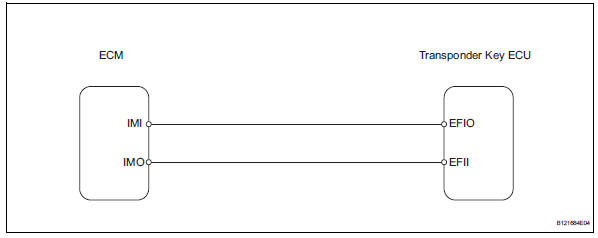
Inspection procedure
- Check for dtc
- Delete the dtc (see page ei-18).
- Recheck for dtc.
Ok: b2799 output does not reoccur.


- Check wire harness (transponder key ecu - ecm)
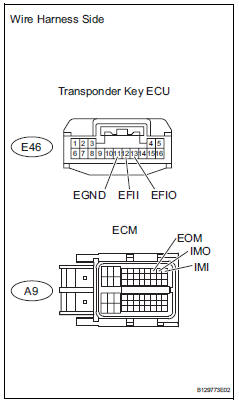
- Disconnect the e46 ecu connector.
- Disconnect the a9 ecm connector.
- Measure the resistance of the wire harness side connectors.
Standard resistance 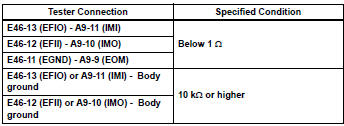


- Check transponder key ecu (operation)
- Temporarily replace the transponder key ecu with a new or normally functioning one.
- Check that then engine starts normally.
Ok: engine starts normally.


End (transponder key ecu is defective)
 Communication malfunction no. 1
Description
This dtc is output when a communication error occurs between the transponder
key amplifier and
transponder key ecu. Some possible reasons for the communication error are: 1) 2
or ...
 Security indicator light circuit
Description
When the transponder key is registered, the transponder key ecu indicates the
key registration condition
by lighting up, blinking or turning off the security indicator.
Wiring diagram ...
Other materials:
Srs airbag instructions
for canadian owners
(in french)
The following is a french explanation of srs airbag instructions
extracted from the srs airbag section in this manual.
See the srs airbag section for more detailed srs airbag instructions
in english.
Coussins gonflables srs avant
Coussin gonflable srs du conducteur/coussin gonflable srs ...
Initialization
Zero point calibration
Notice:
Make sure that the front passenger seat is not
occupied before performing the operation.
Hint:
Perform the zero point calibration and sensitivity check if
any of the following conditions apply.
The occupant classification ecu is replaced.
Accessories ( ...
Light control switch circuit
Description
This circuit detects the state of the headlight dimmer switch.
Wiring diagram
Inspection procedure
Read value of intelligent tester (main body ecu)
Connect the intelligent tester to the dlc3.
Turn the ignition switch on and press the intelligent
tester main switch on ...
