
Toyota RAV4 (XA40) 2013-2018 Service Manual: Diagnosis system
- Description
- Engine immobiliser system data and diagnostic trouble codes (dtcs) can be read through the vehicle's data link connector 3 (dlc3). In some cases, a malfunction may be occurring in the engine immobiliser system even though the security indicator light is not illuminated. When the system seems to be malfunctioning, use the intelligent tester to check for malfunctions and perform repairs.
- Check dlc3
The vehicle's ecu uses the iso 15765-4 communication protocol. The terminal arrangement of the dlc3 complies with sae j1962 and matches the iso 15765-4 format.
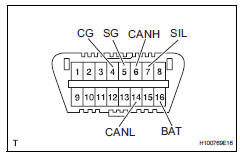
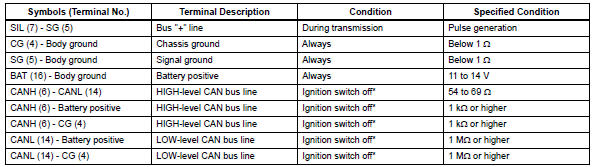
Notice:
*: Before measuring the resistance, leave the vehicle as is for at least 1 minute and do not operate the ignition switch, other switches or doors.
If the result is not as specified, the dlc3 may have a malfunction. Repair or replace the harness and connector.
Hint:
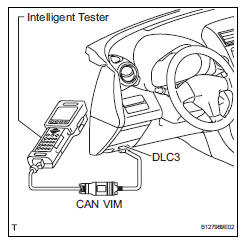
Connect the cable of the intelligent tester (with can vim) to the dlc3, turn the ignition switch on and attempt to use the intelligent tester. If the screen displays unable to connect to vehicle, a problem exists in the vehicle side or the tester side.
If the communication is normal when the tester is connected to another vehicle, inspect the dlc3 on the original vehicle.
If the communication is still not possible when the tester is connected to another vehicle, the problem is probably in the tester itself. Consult the service department listed in the tester's instruction manual.
 Terminals of ecu
Check transponder key amplifier
Disconnect the e5 amplifier connector.
Measure the resistance of the wire harness side
connector.
If the result is not as specified, there may b ...
 Dtc check / clear
Check dtc
Connect the intelligent tester (with can vim) to the
dlc3.
Turn the ignition switch on and turn the intelligent
tester on.
Select the following menu items: diagnosis /
...
Other materials:
Fuel information
You must only use unleaded
gasoline in your vehicle.
Select octane rating 87
(Research Octane Number
91) or higher. Use of
unleaded gasoline with an
octane rating lower than 87
may result in engine knocking.
Persistent knocking
can lead to engine damage.
At minimum, the gasoline you
use should meet ...
Control module communication bus off
Description
Inspection procedure
The skid control ecu inputs the signals from the ecm, steering angle sensor,
and yaw rate and
acceleration sensor via can communication system.
Check harness and connector (momentary interruption)
Using the data list of the intelligent test ...
Hood
Release the lock from the
inside of the vehicle to open
the hood.
Opening the hood
1. Pull the hood lock release
lever.
The hood will pop up slightly.
2. Push the auxiliary catch lever
to the left and lift the hood.
3. Hold the hood open by inserting
the supporting rod into
the slot.
WARNING
â– ...
