
Toyota RAV4 (XA40) 2013-2018 Service Manual: Dtc check / clear
- Check dtc
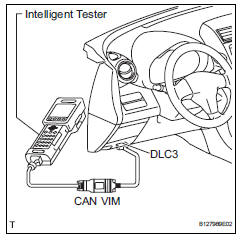
- Connect the intelligent tester (with can vim) to the dlc3.
- Turn the ignition switch on and turn the intelligent tester on.
- Select the following menu items: diagnosis / obd/mobd / immobiliser / dtc info / current codes.
- Check dtcs and then write them down.
Hint:
Refer to the intelligent tester operator's manual for further details.
- Confirm the details of the dtcs (see page ei-20).
- Clear dtc
- Connect the intelligent tester (with can vim) to the dlc3.
- Turn the ignition switch on (do not start the engine) and turn the intelligent tester on.
- Select the following menu items: diagnosis / obd/mobd / immobiliser / dtc info / clear codes.
Hint:
Refer to the intelligent tester operator's manual for further details.
- Erase dtcs by pressing the yes button on the tester.
Hint:
Refer to the intelligent tester operator's manual for further details.
 Diagnosis system
Description
Engine immobiliser system data and diagnostic
trouble codes (dtcs) can be read through the
vehicle's data link connector 3 (dlc3). In some
cases, a malfunction may be occurr ...
 Data list / active test
Read data list
Hint:
Using the intelligent tester's data list allows switch,
sensor, actuator and other item values to be read without
removing any parts. Reading the data list early in
trou ...
Other materials:
Driving position memory
This feature automatically
adjusts the driver's seat to
suit your preferences.
Your preferred driving position
(the position of the
driver's seat) can be
recorded and recalled by
pressing a button.
Two different driving positions
can be recorded into
memory.
Each electronic key can be
registered ...
Functions included in
LTA system
â– Lane departure alert function
When the system determines that the vehicle might depart
from its lane or course*, a warning
is displayed on the multi-information
display, and a warning
buzzer will sound to alert the
driver.
When the warning buzzer sounds,
check the area around your vehicle
and c ...
Tire pressure warning receiver (w/ antenna)
Components
...
