
Toyota RAV4 (XA40) 2013-2018 Service Manual: Front door belt moulding
Components
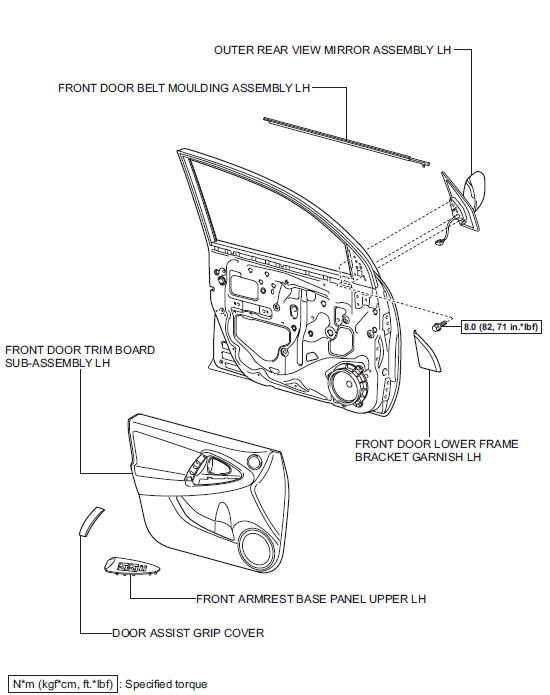
 Installation
Replace roof carrier seal
Remove the seals.
Install new seals as shown in the illustration.
Install roof rack leg front lh
Install the leg cushion front.
Install the roof ...
 Removal
Hint:
Use the same procedures for the rh side and lh side.
The procedures listed below are for the lh side.
Disconnect cable from negative battery terminal
Notice:
Wait at least 90 sec ...
Other materials:
Position initialization incomplete
Description
This dtc is output when the sliding roof drive gear (sliding roof ecu) has
not been initialized.
Wiring diagram
Refer to dtc b2341 (see page rf-11).
Inspection procedure
Initialize sliding roof drive gear sub-assembly (sliding roof ecu)
Check that the sliding roof ...
Automatic
air conditioning system
Air outlets and fan speed are automatically adjusted according
to the temperature setting.
Driver’s side temperature control
dial
Automatic mode button
Micro dust and pollen filter
mode button
Driver’s side temperature setting
display
Fan speed display
Air outlet display ...
Wheels
If a wheel is bent, cracked or heavily corroded, it should be
replaced. Otherwise, the tire may separate from the wheel or
cause a loss of handling control.
Wheel selection
When replacing wheels, care should be taken to ensure that they are
equivalent to those removed in load capacity, diameter ...
