
Toyota RAV4 (XA40) 2013-2018 Owners Manual: Head restraints
Head restraints are provided for all seats.
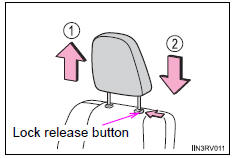
Front seats
- Up
Pull the head restraints up.
- Down
Push the head restraint down while
pressing the lock release button.
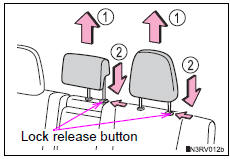
Rear seats
- Up
Pull the head restraints up.
- Down
Push the head restraint down while
pressing the lock release button.
Folding the head restraints (outboard rear seats only)
- To use
Lift up the head restraint until it locks.
- To fold
Push the head restraint lock
release button to fold the head
restraint.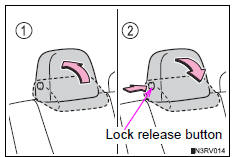
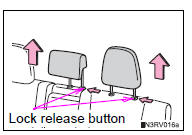
Removing the head restraints
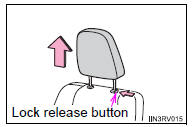
- Front seats
Pull the head restraint up while pressing
the lock release button.
- Rear seats
Pull the head restraint up while pressing
the lock release button.
Installing the head restraints
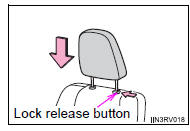
- Front seats
Align the head restraint with the installation
holes and push it down while pressing
the lock release button.
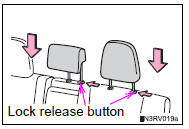
- Rear seats
Align the head restraint with the installation
holes and push it down while pressing
the lock release button.
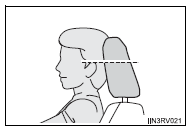
- Adjusting the height of the head restraints
Make sure that the head restraints are
adjusted so that the center of the head
restraint is closest to the top of your ears.
- Adjusting the rear center seat head restraint
Always raise the head restraint one level from the stowed position when using.
Caution
Head restraint precautions
Observe the following precautions regarding the head restraints. Failure to do so may result in death or serious injury.
- Use the head restraints designed for each respective seat.
- Adjust the head restraints to the correct position at all times.
- After adjusting the head restraints, push down on them and make sure they are locked in position.
- Do not drive with the head restraints removed.
 Memory recall function (vehicles with a smart key system)
Each electronic key can be registered to recall your preferred driving
position.
Registering procedure
Record your driving position to button “1� or “2� before performing
the following:
c ...

Other materials:
Abs warning light remains on
Description
If any of the following conditions are detected, the abs warning light
remains on:
The ecu connectors are disconnected from the skid control ecu.
There is a malfunction in the skid control ecu internal circuit.
There is an open or short in the wire harness between the combinat ...
Rear axle hub bolt
Components
Replacement
Hint:
Use the same procedures for the rh side and lh side.
The procedures listed below are for the lh side.
Remove rear wheel
Remove rear disc brake cylinder assembly
lh (see page br-55)
Remove rear disc (see page br-57)
Remove rear axle hub bolt
...
Hazard warning switch
Components
Removal
Disconnect cable from negative battery
terminal
Caution:
Wait at least 90 seconds after disconnecting the
cable from the negative (-) battery terminal to
prevent airbag and seat belt pretensioner activation.
Remove no. 1 Instrument cluster finish
panel cente ...
