
Toyota RAV4 (XA40) 2013-2018 Service Manual: Installation
- Install generator assembly
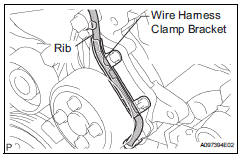
- Confirm that the wire harness of the crankshaft position sensor is secured to the wire harness clamp bracket through the back of the rib of the timing chain cover.
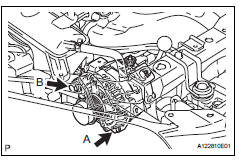
- Install the generator with the 2 bolts.
Torque: 21 n*m (215 kgf*cm, 16 ft.*Lbf) for bolt a 52 n*m (530 kgf*cm, 38 ft.*Lbf) for bolt b
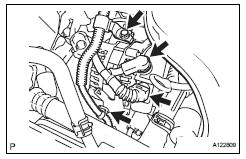
- Install the wire harness clamp.
- Install the wire harness clamp bracket with the bolt.
Torque: 8.4 N*m (85 kgf*cm, 74 in.*Lbf)
- Connect the generator wire with the nut.
Torque: 9.8 N*m (100 kgf*cm, 7 ft.*Lbf)
- Install the terminal cap.
- Connect the generator connector.
- Install fan and generator v belt
- Install the belt (see page em-7).
- Connect cable to negative battery terminal
 Reassembly
Install generator rotor assembly
Install the washer onto the generator rectifier end
frame.
Install the generator rotor onto the generator
rectifier end frame.
Usi ...
 Battery current sensor
On-vehicle inspection
Check battery current sensor assembly
Measure the resistance of the sensor.
Standard resistance
If the result is not as specified, replace the sensor
assembly.
...
Other materials:
Seat belt pretensioners (front seats)
The pretensioners help the seat
belts to quickly restrain the occupants
by retracting the seat belts
when the vehicle is subjected to
certain types of severe frontal or
side collision or a vehicle rollover.
The pretensioners do not activate
in the event of a minor frontal
impact, a minor ...
Cup holders
Front
Rear
Pull the armrest down.
Adjusting the size of the cup holder (front passenger’s side)
The adjuster can be removed.
Caution
Items unsuitable for the cup holders
Do not place anything other than cups or aluminum cans in the cup
holders.
Other items may be thrown out ...
Transmission control cable assembly
Replacement
Remove rear console box sub-assembly
Remove the console box (see page ip-20).
Disconnect cable from negative battery
terminal
Caution:
Wait at least 90 seconds after disconnecting the
cable from the negative (-) battery terminal to
prevent airbag and seat belt pre ...
