
Toyota RAV4 (XA40) 2013-2018 Owners Manual: Installing child restraints
Follow the child restraint system manufacturer’s instructions.
Firmly secure child restraints to the seats using the latch anchors or a seat belt. Attach the top tether strap when installing a child restraint.
The lap/shoulder belt can be used if your child restraint system is not compatible with the latch (lower anchors and tethers for children) system.
Child restraint latch anchors
Latch anchors are provided for
the outside rear seats. (Buttons
displaying the location of the
anchors are attached to the seats.) 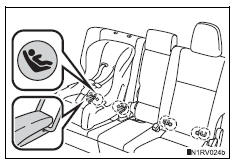
Seat belts equipped with a child
restraint locking mechanism
(alr/elr belts except driver’s
seat belt) 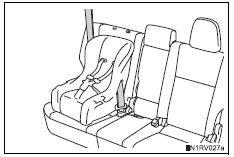
Anchor brackets (for top tether
strap) 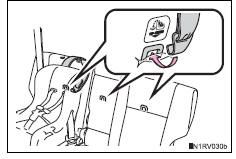
An anchor bracket is provided for each rear seat. (Labels displaying the location of the anchor bracket.)
- Installation with latch system
- Installing child restraints using a seat belt (child restraint lock function belt)
- Child restraint systems with a top tether strap
 Types of child restraints
Child restraint systems are classified into the following 3 types
according to the age and size of the child:
Rear facing „o infant seat/convertible
seat
Forward facing „o convertible
...
 Installation with latch system
Adjust the seatback to the 8th
lock position from the fully
reclined position.
Fully reclined position
8Th lock position
If your child restraint system interferes with a head res ...
Other materials:
Ig2 relay
On-vehicle inspection
Disconnect cable from negative battery
terminal
Caution:
Wait at least 90 seconds after disconnecting the
cable from the negative (-) battery terminal to
prevent airbag and seat belt pretensioner activation.
Remove ig2 relay
Remove the no. 1 Engine room re ...
If your vehicle needs to be
towed
If towing is necessary, we
recommend having your
vehicle towed by your
Toyota dealer or commercial
towing service, using a
wheel-lift type truck or flatbed
truck.
Use a safety chain system
for all towing, and abide by
all state/provincial and local
laws.
Situations when it is necessary
to contact d ...
Dinghy towing
Your vehicle is not designed to be dinghy towed (with 4 wheels
on the ground) behind a motor home.
Notice
To avoid serious damage to your vehicle
Do not tow your vehicle with 4 wheels on
the ground.
To prevent causing serious damage to the transmission and dynamic
torque control awd system ( ...
