
Toyota RAV4 (XA40) 2013-2018 Service Manual: System check
Hint:
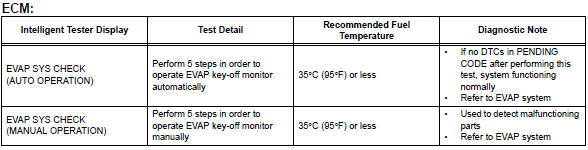
Performing a system check enables the system, which consists of multiple actuators, to be operated without removing any parts. In addition, it can show whether or not any dtcs are set, and can detect potential malfunctions in the system. The system check can be performed with the intelligent tester.
- Connect the intelligent tester to the dlc3.
- Turn the ignition switch on.
- Turn the tester on.
- Select the following menu items: diagnosis / enhanced obd ii / system check.
- Perform the system check by referring to the table below.
 Active test
Hint:
Performing an active test enables components
including the relays, vsv (vacuum switching valve) and
actuators, to be operated without removing any parts.
The active test can be performed w ...
 Diagnostic trouble code chart
Hint:
Parameters listed in the chart may be different than your
readings depending on the type of instrument and other
factors.
If any dtcs are displayed during a check mode dtc check,
check th ...
Other materials:
Rear wiper motor
Components
Removal
Disconnect cable from negative battery
terminal
Caution:
Wait at least 90 seconds after disconnecting the
cable from the negative (-) battery terminal to
prevent airbag and seat belt pretensioner activation.
Remove back door center garnish (see page
ed-59)
...
Disassembly
Hint:
When removing the ornament plate and emblem, heat the
radiator grille, ornament plate and emblem using a heat light.
Standard heating temperature
Notice:
Do not heat the radiator grille, ornament plate and
emblem excessively.
Remove hood to radiator grille seal
Remove th ...
Seat heater switch
Components
Removal
Disconnect cable from negative battery
terminal
Caution:
Wait at least 90 seconds after disconnecting the
cable from the negative (-) battery terminal to
prevent airbag and seat belt pretensioner activation.
Remove switch base (see page ip-18)
Remove seat he ...
