
Toyota RAV4 (XA40) 2013-2018 Service Manual: Diagnostic trouble code chart
Hint:
Parameters listed in the chart may be different than your readings depending on the type of instrument and other factors.
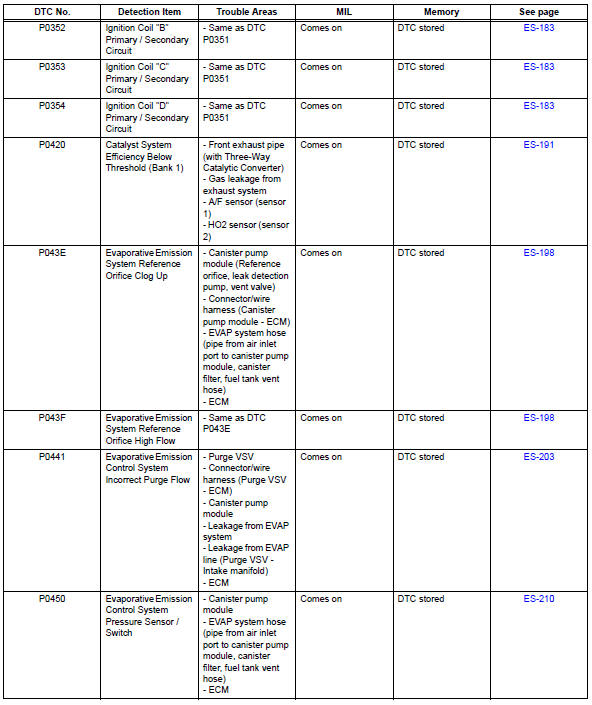
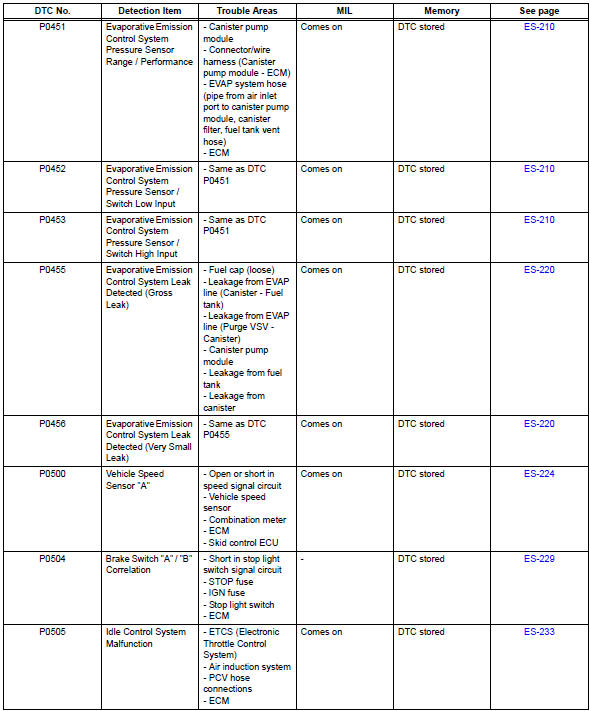
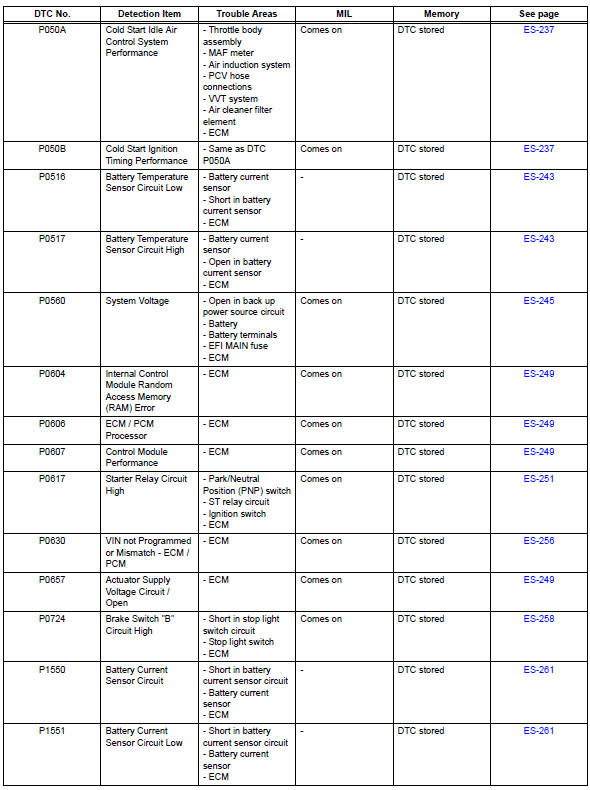
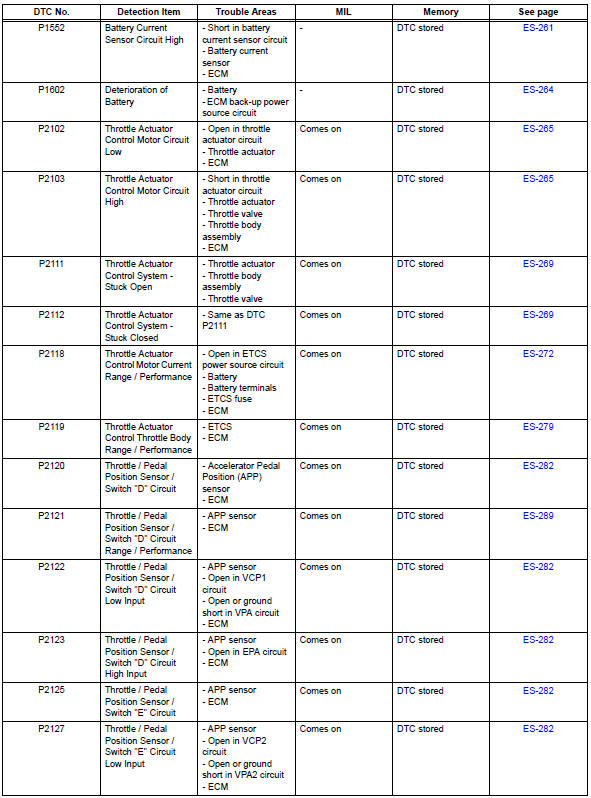
If any dtcs are displayed during a check mode dtc check, check the circuit for the dtcs listed in the table below. For details of each dtc, refer to the page indicated.
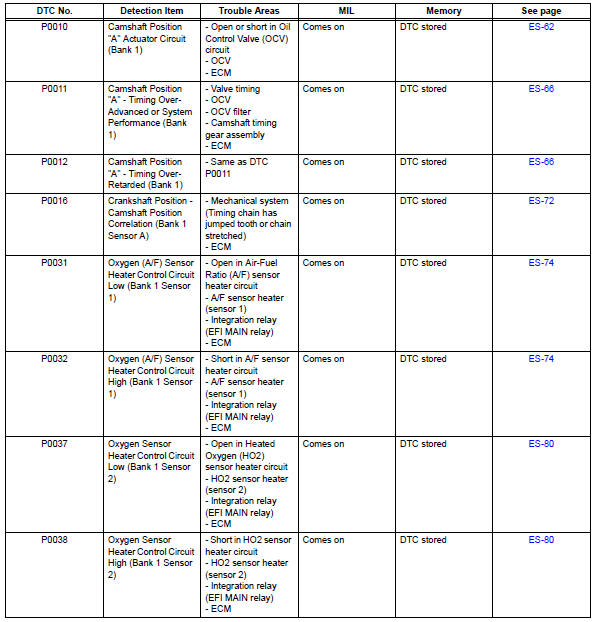
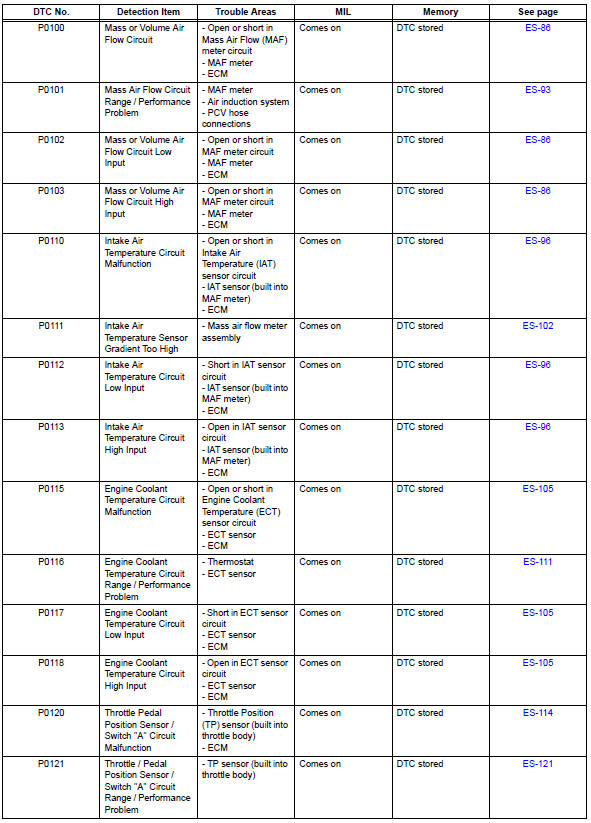

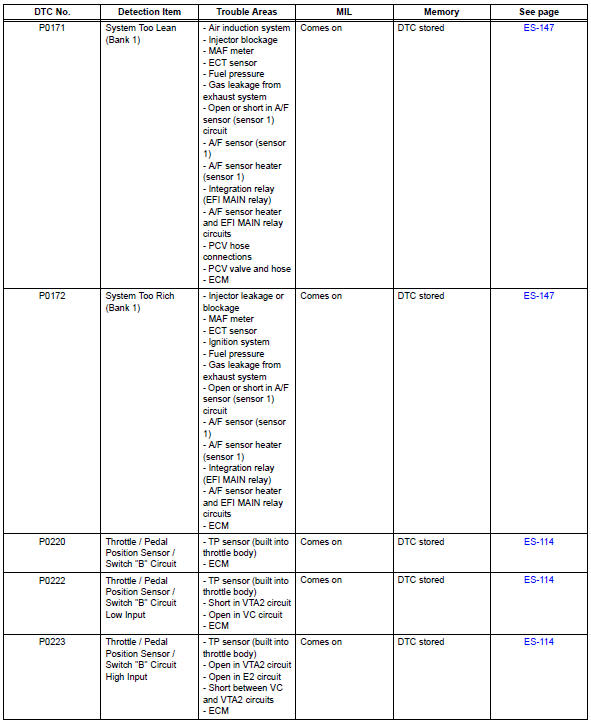
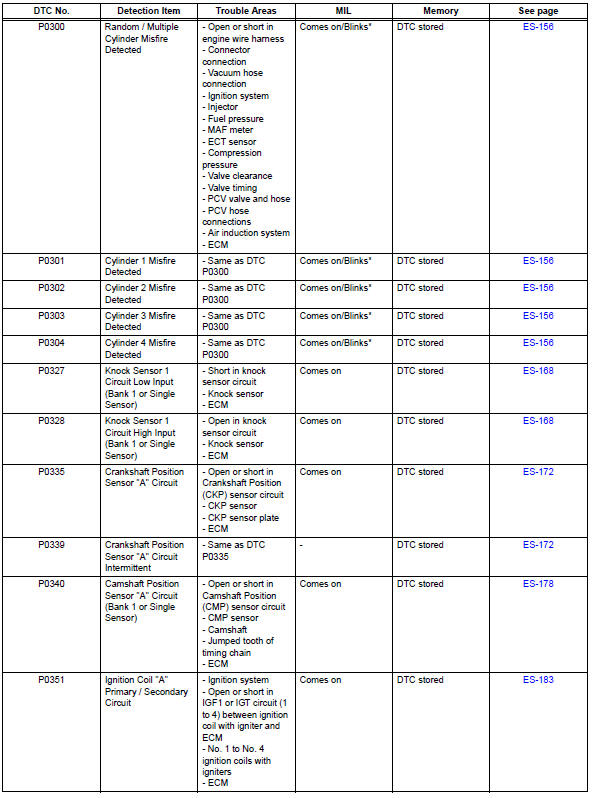
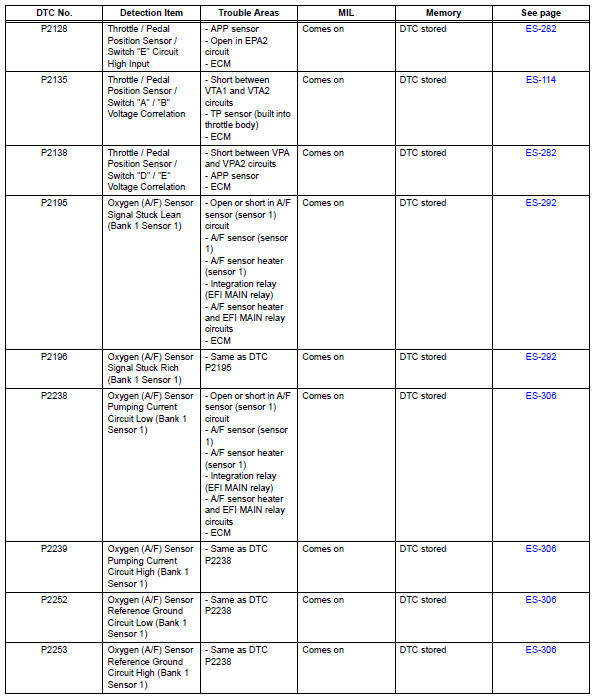
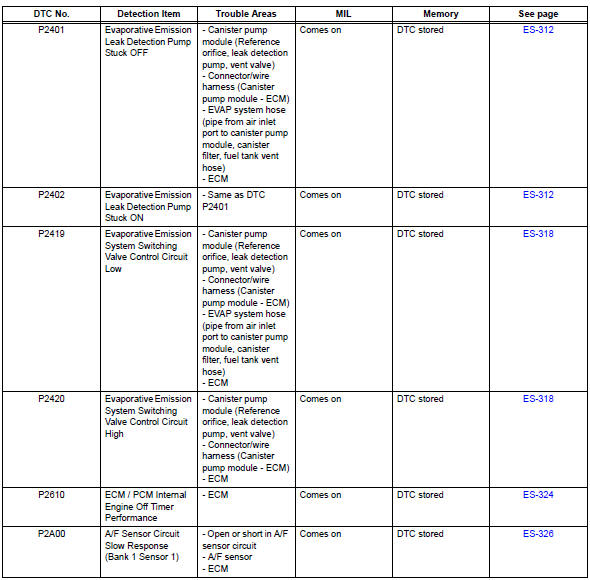
Hint:
*: Mil flashes when a catalyst damaged misfire is detected.
- Camshaft position "a" actuator circuit (bank 1)
- Camshaft position "A"
- Camshaft position correlation (bank 1 sensor a)
- Oxygen (a/f) sensor heater control circuit
- Mass or volume air flow circuit
- Mass air flow circuit range / performance problem
- Intake air temperature circuit malfunction
- Intake air temperature sensor gradient too high
- Engine coolant temperature circuit
- Engine coolant temperature circuit range / performance problem
- Throttle / pedal position sensor / switch "A"
- Throttle / pedal position sensor / switch "A" circuit range / performance problem
- Insufficient coolant temperature for closed loop fuel control
- Coolant thermostat (coolant temperature below thermostat regulating temperature)
- Oxygen sensor circuit
- System too
- Random / multiple cylinder misfire detected
- Knock sensor 1 circuit
- Crankshaft position sensor "A"
- Camshaft position sensor "a" circuit (bank 1 or single sensor)
- Ignition coil
- Catalyst system efficiency below threshold (bank 1)
- Evaporative emission system reference orifice
- Evaporative emission control system incorrect purge flow
- Evaporative emission control system pressure sensor
- Evaporative emission control system leak detected
- Vehicle speed sensor "A"
- Brake switch "A" / "B" correlation
- Idle control system malfunction
- Cold start
- Battery temperature sensor circuit
- System voltage
- Internal control module random access memory (ram) error
- Starter relay circuit high
- Vin not programmed or mismatch - ecm / pcm
- Brake switch "b" circuit high
- Battery current sensor circuit
- Deterioration of battery
- Throttle actuator control motor circuit
- Throttle actuator control system
- Throttle actuator control motor current range / performance
- Throttle actuator control throttle body range / performance
- Throttle / pedal position sensor
- Throttle / pedal position sensor / switch "d" circuit range / performance
- Oxygen (a/f) sensor signal stuck
- Oxygen (a/f) sensor pumping current circuit
- Evaporative emission leak detection pump
- Evaporative emission system switching valve control
- Ecm / pcm internal engine off timer performance
- A/f sensor circuit slow response (bank 1 sensor 1)
- Evap system
- Ecm power source circuit
- Vc output circuit
- Fuel pump control circuit
- Mil circuit
 System check
Hint:
Performing a system check enables the system,
which consists of multiple actuators, to be operated
without removing any parts. In addition, it can show
whether or not any dtcs are set, and c ...
 Camshaft position "a" actuator circuit (bank 1)
Dtc P0010 Camshaft
position "a" actuator circuit (bank
1)
Description
The variable valve timing (vvt) system includes the ecm, ocv and vvt
controller. The ecm sends a
target du ...
Other materials:
Tc and cg terminal circuit
Description
Dtc output mode is set by connecting terminals tc and cg of the dlc3.
The dtcs are displayed by blinking the srs warning light.
Hint:
Make sure that dtc b1281 has not been output. If dtc b1281 has been
output, refer to the multiplex
communication system.
When each warning ...
Operation check
Check key reminder warning system
Check that the key reminder warning buzzer
sounds.
With the driver side door closed, insert the key
into the ignition key cylinder and then turn the
ignition switch to lock or acc.
Check that the buzzer sounds intermittently
when the driver ...
Basic inspection
When measuring resistance of
electronic parts
Unless otherwise stated, all resistance
measurements should be made at an ambient
temperature of 20°c (68°f). Resistance
measurements may be inaccurate if measured
at high temperatures, i.E. Immediately after the
vehicle has been r ...
