
Toyota RAV4 (XA40) 2013-2018 Service Manual: Brake switch "b" circuit high

Description
The purpose of this circuit is to prevent the engine from stalling while driving in the lock-up condition when the brakes are suddenly applied.
When the brake pedal is depressed, this switch sends a signal to the ecm. Then the ecm cancels the operation of the lock-up clutch while braking is in progress.

Monitor description
This dtc indicates that the stop light switch remains on. When the stop light switch remains on during go and stop driving, the ecm interprets this as a fault in the stop light switch. Then the mil illuminates and the ecm stores the dtc. The vehicle must go (30 km/h (18.63 Mph) or more) and stop (less than 3 km/h (1.86 Mph)) 5 times for 2 driving cycles in order for the dtc to be output.
Monitor strategy

Typical enabling conditions

Typical malfunction thresholds

Wiring diagram
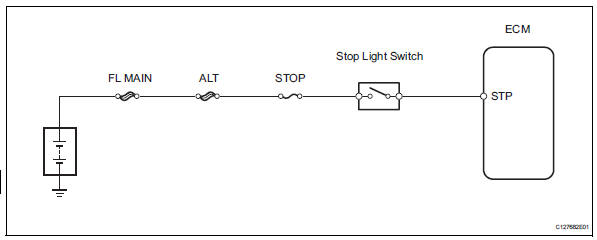
Inspection procedure
Hint:
Using the intelligent tester's data list allows switch, sensor, actuator and other item values to be read without removing any parts. Reading the data list early in troubleshooting is one way to save time.
Notice:
In the table below, the values listed under "normal condition" are reference values. Do not depend solely on these reference values when deciding whether a part is faulty or not.
- Warm up the engine.
- Turn the ignition switch off.
- Connect the intelligent tester to the can vim. Then connect the can vim to the dlc3.
- Turn the ignition switch on
- Turn the intelligent tester on.
- Enter the following menus: diagnosis / enhanced obd ii / data list.
- Follow the instructions on the tester and read the data list.

- Inspect stop light switch
- Remove the a3 stop light switch.
- Measure the resistance of the switch.
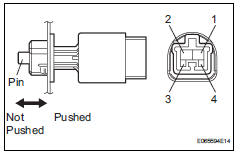
Standard resistance 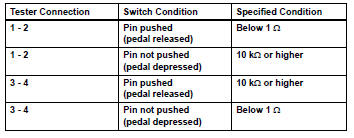


- Check wire harness (ecm - battery)
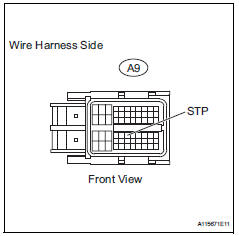
- Measure the voltage of the wire harness side connector.
Standard voltage 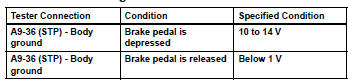

 Vin not programmed or mismatch - ecm / pcm
Description
Dtc p0630 is set when the vehicle identification number (vin) is not stored
in the engine control module
(ecm) or the input vin is incorrect. Input the vin with the intelligent tester. ...
 Battery current sensor circuit
Description
The battery current sensor installed on the positive (+) battery terminal
detects the amount of current
supplied from the generator.
The battery current sensor changes curre ...
Other materials:
Turn signal lever
Operating instructions
Right turn
Lane change to the right (move
the lever partway and release
it)
the right hand signals will flash 3
times.
Lane change to the left (move
the lever partway and release
it)
the left hand signals will flash 3
times.
Left turn
Turn signals ...
Removal
Disconnect cable from negative battery terminal
Caution:
Wait at least 90 seconds after disconnecting the
cable from the negative (-) battery terminal to
prevent airbag and seat belt pretensioner activation.
Remove mass air flow meter
Disconnect the mass air flow meter connector.
...
Ecm / pcm internal engine off timer performance
Dtc summary
Description
To ensure the accuracy of the evap (evaporative emission) monitor values, the
soak timer, which is built
into the ecm, measures 5 hours (+-15 minutes) from when the ignition switch is
turned off, before the
monitor is run. This allows the fuel to cool down, wh ...
