
Toyota RAV4 (XA40) 2013-2018 Service Manual: Oil pump
Components
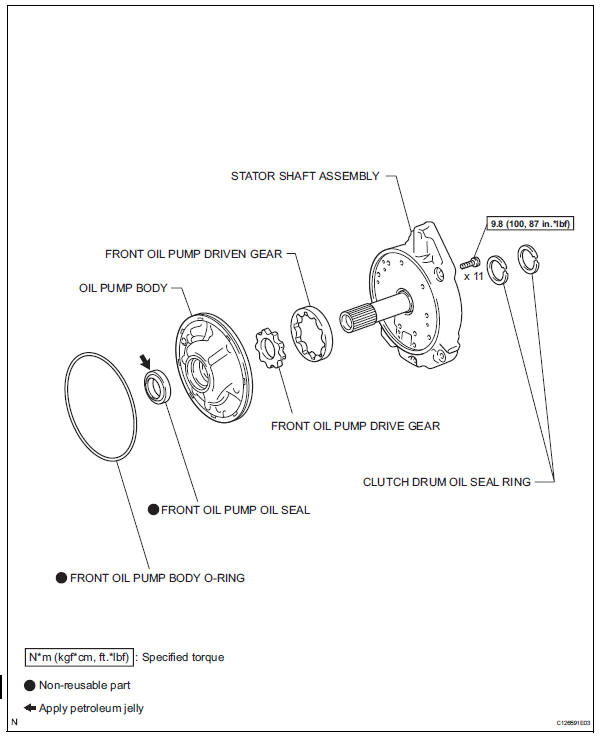
 Reassembly
Bearing position
Standard bearing position
Install differential gear lube apply tube
Install the apply tube and clamp to the transaxle
housing with the bolt.
Torque: ...
 Disassembly
Inspect oil pump assembly (see page ax-218)
Remove clutch drum oil seal ring
Remove the 2 clutch drum oil seal rings.
Remove stator shaft assembly
Using a t30 ''torx'' socke ...
Other materials:
Coolant
Replacement
Remove no. 1 Engine under cover
Drain engine coolant
Loosen the radiator drain cock plug.
Hint:
Collect the coolant in a container and dispose of it
according to the regulations in your area.
Remove the radiator reservoir cap.
Caution:
Do not remove the radiator ...
Camshaft position correlation (bank 1 sensor a)
Dtc P0016 P0016 crankshaft position - camshaft position correlation
(bank 1 sensor a)
Description
In the vvt (variable valve timing) system, the appropriate intake valve open
and close timing is
controlled by the ecm. The ecm performs intake valve control by performing the
following: 1) cont ...
Data list / active tes
Read data list
Hint:
Using the intelligent tester's data list allows switch,
sensor, actuator and other item values to be read without
removing any parts. Reading the data list early in
troubleshooting is one way to save time.
Connect the intelligent tester (with can vim) to the
dlc3 ...
