
Toyota RAV4 (XA40) 2013-2018 Service Manual: Problem symptoms table
Hint:
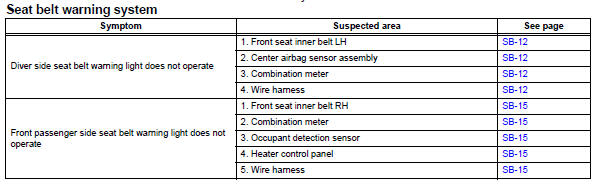
Use the table below to help determine the cause of the problem symptom. The potential causes of the symptoms are listed in order of probability in the "suspected area" column of the table. Check each symptom by checking the suspected areas in the order they are listed. Replace parts as necessary.
 Operation check
Inspect driver side seat belt warning light
Turn the ignition switch on.
When the driver seat belt is not fastened, check that
the driver seat belt warning light on the combination
mete ...
 Terminals of ecu
Check combination meter assembly
Disconnect the e19 meter connector.
Measure the voltage and resistance of the wire
harness side connector.
If the result is not as specifie ...
Other materials:
Open in pump motor circuit
Description
The motor relay drives the pump motor based on a signal from the skid control
ecu.
Wiring diagram
Refer to dtc c0273/13, c0274/14, c1361/91 (see page bc-79).
Inspection procedure
Perform active test by intelligent tester (motor relay)
Select the active test, gener ...
Headlight aim
Vertical movement adjusting
bolts
Adjustment bolt A
Adjustment bolt B
Before checking the headlight
aim
Make sure the vehicle has a
full tank of gasoline and the
area around the headlight is
not deformed.
Park the vehicle on level
ground.
Make sure the tire inflation
pressure is at the ...
Function summary
The following operations can be performed simply by carrying the
electronic key on your person, for example in your pocket. (The driver
should always carry the electronic key.)
Locks and unlocks the side doors
Locks and unlocks the back door
Starts the engine
Operation signals
A bu ...
