
Toyota RAV4 (XA40) 2013-2018 Service Manual: Problem symptoms table (2005/11-2006/01)
Hint:
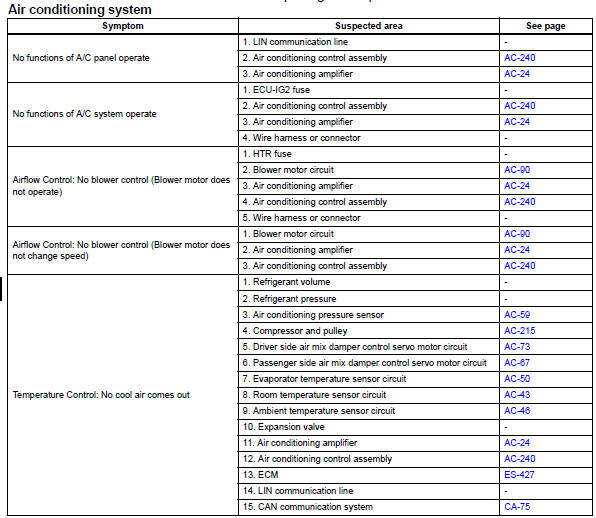
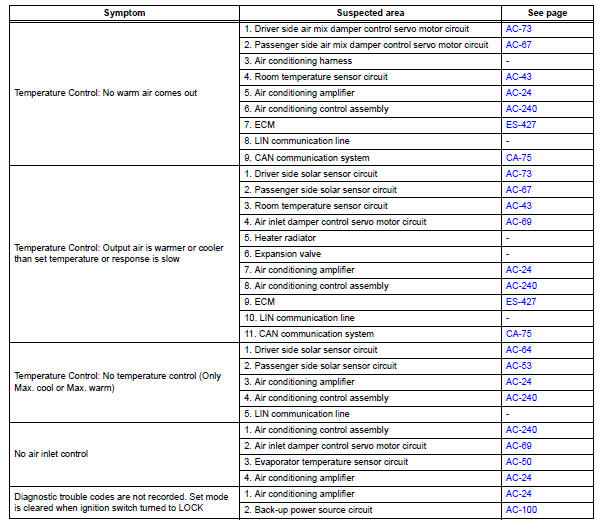
- Use the table below to help determine the cause of the problem symptom. The potential causes of the symptoms are listed in order of probability in the "suspected area" column of the table. Check each symptom by checking the suspected areas in the order they are listed. Replace parts as necessary.
- Inspect the fuses and relays related to this system before inspecting the suspected areas below.
 Customize parameters
Hint:
The following items can be customized.
Notice:
When the customer requests a change in a function,
first make sure that the function can be customized.
Be sure to make a note of the cur ...
 Problem symptoms table (2006/01- )
Hint:
Use the table below to help determine the cause of the
problem symptom. The potential causes of the symptoms
are listed in order of probability in the "suspected area"
column ...
Other materials:
Initialization
Initialize sliding roof drive gear subassembly
Notice:
When replacing the sliding roof drive gear, the
sliding roof drive gear requires initialization. If a
reset is not executed, the following functions do not
operate: auto operation and key off operation.
Turn the ignition switch on. ...
Windshield wiper de-icer
This feature is used to prevent ice from building up on the windshield
and wiper blades.
On/off
The windshield wiper de-icer will
automatically turn off after approximately
15 minutes. Pressing the
switch again also turns the de-icer
off.
Operating conditions
Vehicles without a smart ...
Vc output circuit
Description
The ecm constantly generates 5 v power from the battery voltages supplied to
the +b (batt) terminal to
operate the microprocessor. The ecm also provides this power to the sensors
through the vc output
circuit.
When the vc circuit is short-circuited, the microprocessor in the ...
