
Toyota RAV4 (XA40) 2013-2018 Service Manual: Rear occupant classification sensor rh collision detection

Description
Dtc b1788 is output when the occupant classification ecu receives a collision detection signal sent by the rear occupant classification sensor rh when an accident occurs.
Dtc b1788 is also output when the front seat rh is subjected to a strong impact, even if an actual accident does not occur.
However, when the occupant classification ecu outputs a collision detection signal, even if the vehicle is not in a collision, dtc b1788 can be cleared by performing the zero point calibration and sensitivity check.
Therefore, when dtc b1788 is output, first perform the zero point calibration and sensitivity check.

Wiring diagram
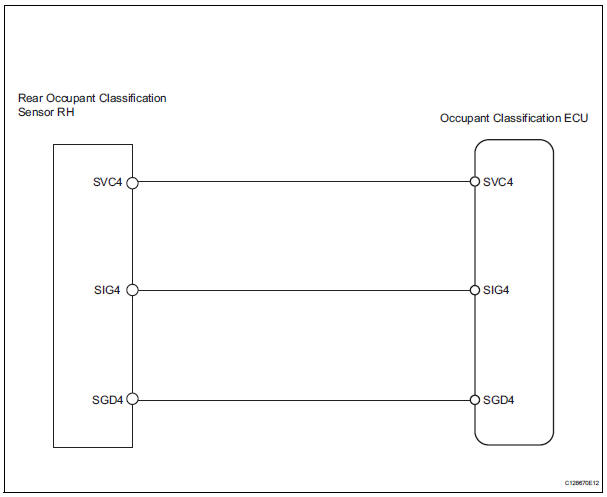
Inspection procedure
- Perform zero point calibration
- Connect the intelligent tester to the dlc3.
- Turn the ignition switch on.
- Using the intelligent tester, perform the zero point calibration (see page rs-241).
Ok: completed is displayed.


- Perform sensitivity check
- Using the intelligent tester, perform the sensitivity check (see page rs-241).
Standard value: 27 to 33 kg (59.52 To 72.75 Lb)


- Check for dtc
- Turn the ignition switch on.
- Clear the dtcs (see page rs-249).
Hint:
First clear dtcs stored in the occupant classification ecu and then in the center airbag sensor.
- Turn the ignition switch off.
- Turn the ignition switch on.
- Check the dtcs (see page rs-249).
Ok: dtc b1788 is not output.
Hint:
Dtcs other than dtc b1788 may be output at this time, but they are not related to this check.


- Replace front seat assembly rh
- Turn the ignition switch off.
- Disconnect the cable from the negative (-) battery terminal, and wait for at least 90 seconds.
- Replace the front seat rh (see page se-8).
Hint:
Perform the inspection using parts from a normal vehicle if possible.

- Perform zero point calibration
- Connect the cable to the negative (-) battery terminal, and wait for at least 2 seconds.
- Connect the intelligent tester to the dlc3.
- Turn the ignition switch on.
- Using the intelligent tester, perform the zero point calibration (see page rs-241).
Ok: completed is displayed.


- Perform sensitivity check
- Using the intelligent tester, perform the sensitivity check (see page rs-241).
Standard value: 27 to 33 kg (59.52 To 72.75 Lb)


- Check for dtc
- Turn the ignition switch on.
- Clear the dtcs (see page rs-249).
Hint:
First clear dtcs stored in the occupant classification ecu and then in the center airbag sensor.
- Turn the ignition switch off.
- Turn the ignition switch on.
- Check the dtcs (see page rs-249).
Ok: dtc b1788 is not output.
Hint:
Dtcs other than dtc b1788 may be output at this time, but they are not related to this check.


- Replace occupant classification ecu
- Turn the ignition switch off.
- Disconnect the cable from the negative (-) battery terminal, and wait for at least 90 seconds.
- Replace the occupant classification ecu (see page rs- 392).

- Perform zero point calibration
- Connect the cable to the negative (-) battery terminal, and wait for at least 2 seconds.
- Connect the intelligent tester to the dlc3.
- Turn the ignition switch on.
- Using the intelligent tester, perform the zero point calibration (see page rs-241).
Ok: completed is displayed.

- Perform sensitivity check
- Using the intelligent tester, perform the sensitivity check (see page rs-241).
Standard value: 27 to 33 kg (59.52 To 72.75 Lb)

End
 Rear occupant classification sensor lh collision detection
Description
Dtc b1787 is output when the occupant classification ecu receives a collision
detection signal sent by
the rear occupant classification sensor lh when an accident occurs.
Dtc b1787 ...
 Center airbag sensor assembly communication circuit malfunction
Description
The center airbag sensor communication circuit consists of the occupant
classification ecu and the
center airbag sensor.
Dtc b1790 is recorded when a malfunction is detected in ...
Other materials:
Wireless charger (if
equipped)
A portable device can be
charged by just placing Qi standard
wireless charge compatible
portable devices according to
the Wireless Power Consortium,
such as smartphones and
mobile batteries, etc., on the
charge area.
This function cannot be used
with portable devices that are
larger than the chargi ...
Data list / active test (2006/01- )
Read data list
Hint:
Using the intelligent tester's data list allows switch,
sensor, actuator and other item values to be read without
removing any parts. Reading the data list early in
troubleshooting is one way to save time.
Connect the intelligent tester (with can vim) to the
...
Adjusting the mirrors
Make sure that you can see backward clearly by adjusting the inside
and outside rear view mirrors properly.
Caution
Observe the following precautions.
Failure to do so may result in death or serious injury.
Do not adjust the position of the driver’s seat while driving.
Doing so could ...
