
Toyota RAV4 (XA40) 2013-2018 Service Manual: Removal
- Drain differential oil
- Remove rear wheel
- Remove tailpipe assembly
- Remove the tailpipe (see page ex-2).
- Remove center exhaust pipe assembly
- Remove the center pipe (see page ex-2).
- Remove propeller with center bearing shaft assembly (see page pr-3)
- Remove rear suspension member brace lh
- Remove the 2 bolts and brace from the suspension member.
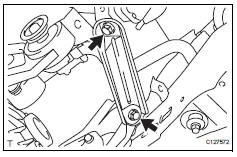
- Remove rear suspension member brace r
h
Hint:
Use the same procedures described for the lh side.
- Remove rear differential carrier subassembly
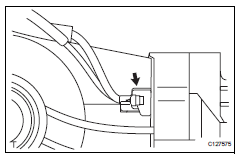
- Disconnect the harness clamp.
- Remove the breather tube.
- Disconnect the connector.
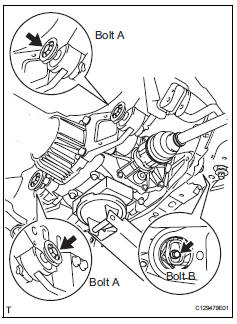
- Support the rear differential carrier with a transmission jack or equivalent.
- Fix the nuts in place and remove bolt a, bolt b and bolt c.
Notice:
Do not loosen the nuts. Loosen the bolts.
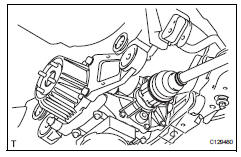
- Slowly lower the jack and then tilt the rear differential carrier.
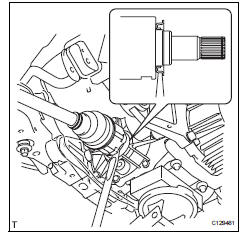
- Set the tip of the tire lever to the position on the rear
drive shaft inboard joint shown in the illustration.
Then, using the ribbed part of the rear differential carrier as a fulcrum, disconnect the left and right rear drive shafts.
Notice:
Do not scratch the rear drive shaft dust cover.
- Remove rear differential no. 1 And no. 2 Support
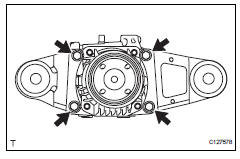
- Remove the 4 bolts and differential no. 1 And no. 2 Supports from the differential carrier.
- Remove rear differential support
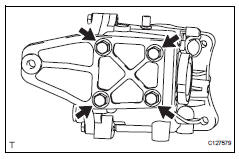
- Remove the 4 bolts and differential support from the differential carrier.
 Rear differential carrier assembly
Components
...
 Disassembly
Fix differential carrier sub-assembly
Fix the rear differential carrier in place with the
overhaul attachment.
Remove stud bolt
Remove the 4 stud bolts from the transmission
c ...
Other materials:
How to proceed with troubleshooting
Hint:
Use these procedures to troubleshoot the supplemental
restraint system.
*: Use the intelligent tester.
Vehicle brought to workshop
Inspect battery voltage*
Standard voltage:
11 to 14 v
If the voltage is below 11 v, recharge or replace the battery
before proceeding.
...
Differential oil seal
Components
Replacement
Replace transaxle housing oil seal lh
Drain the automatic transaxle fluid.
Remove the drain plug and gasket, and drain
atf.
Install a new gasket and drain plug.
Torque: 47 n*m (479 kgf*cm, 35 ft.*Lbf)
Remove the front drive shaft lh (see pag ...
Closing the fuel tank cap
After refueling, turn the fuel tank
cap until you hear a click. Once
the cap is released, it will turn
slightly in the opposite direction.
Caution
When replacing the fuel tank cap
Do not use anything but a genuine toyota fuel tank cap designed for
your
vehicle. Doing so may cause a fire ...
