
Toyota RAV4 (XA40) 2013-2018 Service Manual: Skid control buzzer circuit
Description
The skid control buzzer sounds while the vsc is activated.
Wiring diagram
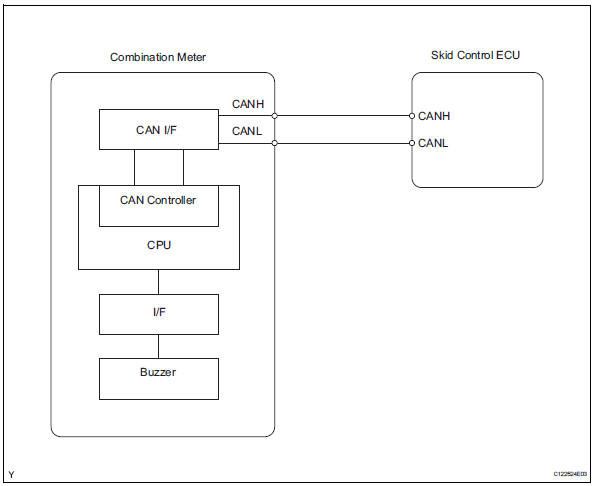
Inspection procedure
Notice:
When replacing the abs and traction actuator, perform the zero point calibration (see page bc- 24).
- Check can communication system
- Check if the can communication dtc is output (see page ca-34).
Result 



- Perform active test by intelligent tester (skid control buzzer)
- Select the active test, generate a control command, and then check that the skid control buzzer operate.

Ok: the skid control buzzer can be heard.


- Inspect combination meter
- Inspect the combination meter (see page me-15).


Replace abs and traction actuator assembly
 Auto lsd indicator light does not come on
Description
Refer to the description of "auto lsd indicator light remains on" (see page
bc-164).
Wiring diagram
Refer to the auto lsd indicator light circuit (see page bc-165).
Inspect ...
 Tc and cg terminal circuit
Description
Connecting terminals tc and cg of the dlc3 causes the skid control ecu to
display 2-digit dtcs by
flashing the abs warning light.
Wiring diagram
Inspection procedure
Check dl ...
Other materials:
For vehicles equipped with vehicle stability (vsc) system
Notices when using drum tester
Before beginning testing, disable the vsc. To
disable the vsc, turn the ignition switch off
and connect sst to terminals 12 (ts) and 4
(cg) of the dlc3.
Sst 09843-18040
Notice:
Confirm that the vsc warning light blinks.
Vsc system will be r ...
Reassembly
Hint:
Use the same procedures for the rh side and lh side.
The procedures listed below are for the lh side.
Install seat lock release band
Install the band with nut.
Hint:
After installing the band, feed it through the
seatback frame hole towards the rear of the vehicle.
I ...
Random / multiple cylinder misfire detected
Description
When the engine misfires, high concentrations of hydrocarbons (hc) enter the
exhaust gas. Extremely
high hc concentration levels can cause increases in exhaust emission levels.
High concentrations of hc
can also cause increases in the three-way catalytic converter (twc) te ...
