
Toyota RAV4 (XA40) 2013-2018 Service Manual: System diagram
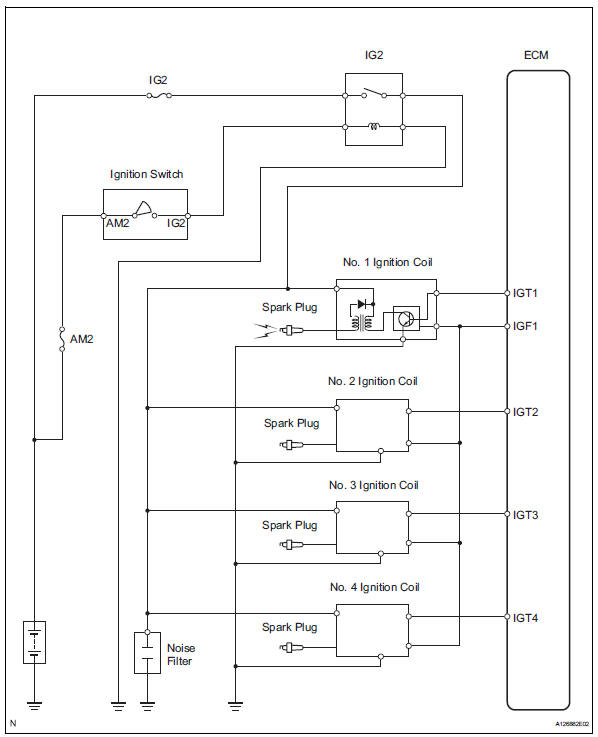
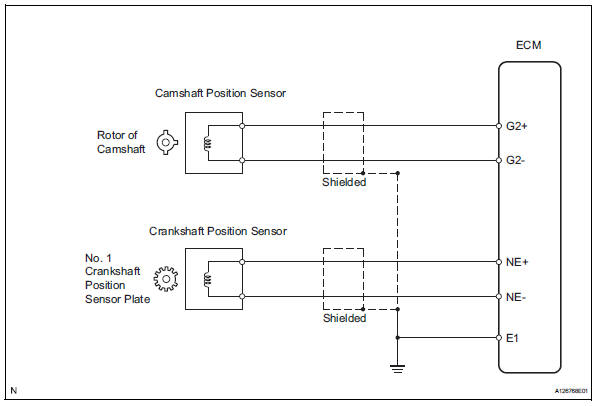
 Parts location
...
 On-vehicle inspection
Check ignition coil assembly and perform spark test
Notice:
in this section, the terms "cold" and "hot" refer to
the temperature of the coils. "Cold" means
appro ...
Other materials:
Changing the display
The multi-information display is
operated using the meter control
switches.
Scroll the screen*/switch the
display*/move the cursor
Press: Enter/Set
Press and hold: Reset/Display
customizable items
Return to the previous screen
Call sending/receiving and
history display (if equipped)
Linke ...
Brake
General maintenance
Inspect brake lines and hoses
Hint:
Work in a well-lighted area. Turn the front wheels fully to
the right or left before beginning the inspection.
Using a mirror, check the entire circumference and
length of the brake lines and hoses for:
Damage
Wear
...
Installation
Install engine coolant temperature
sensor
Install a new gasket onto the sensor.
Using sst, install the sensor.
Sst 09817-33190
torque: 19.6 N*m (200 kgf*cm, 14 ft.*Lbf)
Connect the sensor connector.
Install air cleaner case (see page es-431)
Install air cleaner cap ( ...
