
Toyota RAV4 (XA40) 2013-2018 Owners Manual: The keys
The following keys are provided with the vehicle.
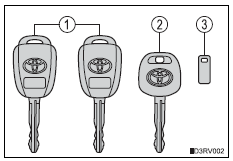
- Vehicles without a smart key system (type a)
- Master keys
Operating the wireless remote control function
- Valet key
- Key number plate
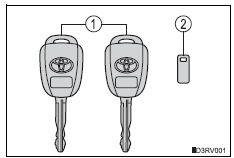
- Vehicles without a smart key system (type b)
- Master keys
Operating the wireless remote control function
- Key number plate
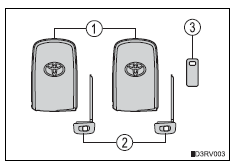
- Vehicles with a smart key system
- Electronic keys
- Operating the smart key system
- Operating the wireless remote control function
- Mechanical keys
- Key number plate
 Key information
...
 Using the mechanical key (vehicles with a smart key system)
To take out the mechanical key,
push the release button and take
the key out.
The mechanical key can only be
inserted in one direction, as the
key only has grooves on one side.
If the key cann ...
Other materials:
Rear axle hub bolt
Components
Replacement
Hint:
Use the same procedures for the rh side and lh side.
The procedures listed below are for the lh side.
Remove rear wheel
Remove rear disc brake cylinder assembly
lh (see page br-55)
Remove rear disc (see page br-57)
Remove rear axle hub bolt
...
4Wd control ecu communication stop mode
Description
Hint:
For vehicle with 4wd only.
Wiring diagram
Inspection procedure
Notice:
Turn the ignition switch off before measuring the resistances of the
main wire and the branch
wire.
After the ignition switch is turned off, check that the key reminder
warning system ...
On-vehicle inspection
Check ignition coil assembly and perform spark test
Notice:
in this section, the terms "cold" and "hot" refer to
the temperature of the coils. "Cold" means
approximately -10 to 50°c (14 to 122°f). "Hot" means
approximately 50 to 100°c (122 to 212 ...
