
Toyota RAV4 (XA40) 2013-2018 Owners Manual: Using the mechanical key (vehicles with a smart key system)
To take out the mechanical key, push the release button and take the key out.
The mechanical key can only be inserted in one direction, as the key only has grooves on one side.
If the key cannot be inserted in a lock cylinder, turn it over and reattempt to insert it.
After using the mechanical key,
store it in the electronic key. Carry
the mechanical key together with
the electronic key. If the electronic
key battery is depleted or the entry
function does not operate properly,
you will need the mechanical key.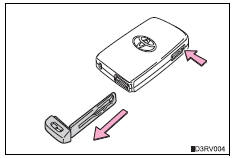
If you lose your keys
New genuine keys can be made by your toyota dealer using a master key (vehicles without a smart key system) or the other key (vehicles with a smart key system) and the key number stamped on your key number plate. Keep the plate in a safe place such as your wallet, not in the vehicle.
When riding in an aircraft
When bringing a key with wireless remote control function onto an aircraft, make sure you do not press any buttons on the key while inside the aircraft cabin. If you are carrying the key in your bag etc., Ensure that the buttons are not likely to be pressed accidentally. Pressing a button may cause the key to emit radio waves that could interfere with the operation of the aircraft.
Notice
To prevent key damage
- Do not drop the keys, subject them to strong shocks or bend them.
- Do not expose the keys to high temperatures for long periods of time.
- Do not get the keys wet or wash them in an ultrasonic washer etc.
- Do not attach metallic or magnetic materials to the keys or place the keys close to such materials.
- Do not disassemble the keys.
- Do not attach a sticker or anything else to the surface of the electronic key.
- Do not place the keys near objects that produce magnetic fields, such as tvs, audio systems and induction cookers, or medical electrical equipment, such as low-frequency therapy equipment.
Carrying the electronic key on your person (vehicles with a smart key system)
Carry the electronic key 3.9 In. (10 Cm) or more away from electric appliances that are turned on. Radio waves emitted from electric appliances within 3.9 In. (10 Cm) of the electronic key may interfere with the key, causing the key to not function properly.
In case of a smart key system malfunction or other key-related problems (vehicles with a smart key system)
Take your vehicle with all the electronic keys provided with your vehicle to your toyota dealer.
When an electronic key is lost (vehicles with a smart key system)
If the electronic key remains lost, the risk of vehicle theft increases significantly.
Visit your toyota dealer immediately with all remaining electronic keys that was provided with your vehicle.
 The keys
The following keys are provided with the vehicle.
Vehicles without a smart key system (type a)
Master keys
Operating the wireless remote control
function
Valet key
Key number plate ...

Other materials:
Replacement
discharge refrigerant from refrigeration system
Start up the engine.
Turn the a/c switch on.
Operate the cooler compressor with an engine
speed of approximately 1,000 rpm for 5 to 6 minutes
to circulate the refrigerant and collect the
compressor oil remaining in each component int ...
Multi-information display
Display contents
The multi-information display presents the driver with a variety of driving-
related data including the current outside air temperature.
Outside temperature display
Indicates the outside temperature.
The temperature range that can be
displayed is from -40„af (-40„ac) t ...
Data list / active test
Hint:
Using the intelligent tester's data list allows switch, sensor,
actuator and other item values to be read without removing
any parts. Reading the data list early in troubleshooting is
one way to save time.
Data list for occupant classification ecu
Connect the intelligent test ...
