
Toyota RAV4 (XA40) 2013-2018 Owners Manual: The rear cross traffic alert function
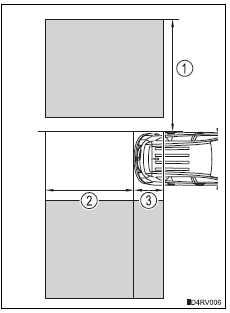
The areas that vehicles can be detected in are outlined below.
The range of the detection area extends to:
- Approximately 11.5 Ft. (3.5 M) from the side of the vehicle
The first 1.6 Ft. (0.5 M) from the side of the vehicle is not in the detection area
- Approximately 9.8 Ft. (3 M) from the rear bumper
- Approximately 3.3 Ft. (1 M) forward of the rear bumper
Caution
Cautions regarding the use of the system
The driver is solely responsible for safe driving. Always drive safely, taking care to observe your surroundings.
The blind spot monitor function is a supplementary function which alerts the driver that a vehicle is present in the blind spot. Do not overly rely on the blind spot monitor function. The function cannot judge if it is safe to change lanes, therefore over reliance could cause an accident resulting in death or serious injury.
According to conditions, the system may not function correctly. Therefore the driver’s own visual confirmation of safety is necessary.
The blind spot monitor function is operational when
- The bsm main switch is set to on
- Vehicle speed is greater than approximately 10 mph (16 km/h).
The blind spot monitor function will detect a vehicle when
- A vehicle in an adjacent lane overtakes your vehicle.
- Another vehicle enters the detection area when it changes lanes.
Conditions under which the blind spot monitor function will not detect a vehicle
The blind spot monitor function is not designed to detect the following types of vehicles and/or objects:
- Small motorcycles, bicycles, pedestrians, etc.*
- Vehicles traveling in the opposite direction
- Guardrails, walls, signs, parked vehicles and similar stationary objects*
- Following vehicles that are in the same lane*
- Vehicles driving 2 lanes across from your vehicle*
*: Depending on conditions, detection of a vehicle and/or object may occur.
Conditions under which the blind spot monitor function may not function correctly
- The blind spot monitor function may not detect vehicles correctly in the following conditions:
- During bad weather such as heavy rain, fog, snow, etc.
- When ice, mud, etc. Is attached to the rear bumper
- When driving on a road surface that is wet due to rain, standing water, etc.
- When there is a significant difference in speed between your vehicle and the vehicle that enters the detection area
- When a vehicle is in the detection area from a stop and remains in the detection area as your vehicle accelerates
- When driving up or down consecutive steep inclines, such as hills, a dip in the road, etc
- When multiple vehicles approach with only a small gap between each vehicle
- When vehicle lanes are wide, and the vehicle in the next lane is too far away from your vehicle
- When the vehicle that enters the detection area is traveling at about the same speed as your vehicle
- When there is a significant difference in height between your vehicle and the vehicle that enters the detection area
- Directly after the bsm main switch is set to on
- When towing a trailer
- When items such as a bicycle carrier are installed on the rear of the vehicle.
- Instances of the blind spot monitor function unnecessarily detecting a vehicle and/or object may increase under the following conditions:
- When there is only a short distance between your vehicle and a guardrail, wall, etc.
- When there is only a short distance between your vehicle and a following vehicle
- When vehicle lanes are narrow and a vehicle driving 2 lanes across from your vehicle enters the detection area
- When items such as a bicycle carrier are installed on the rear of the vehicle
 The blind spot monitor
function
The blind spot monitor
function
The blind spot monitor function uses radar sensors to detect vehicles
that are traveling in an adjacent lane in the area that is not reflected in
the outside rear view mirror (the blind spot), and a ...
 The rear cross traffic alert function
The rear cross traffic alert functions when your vehicle is in reverse.
It can detect other vehicles approaching from the right or left rear of
the vehicle. It uses radar sensors to alert the driv ...
Other materials:
Fuel consumption information
The fuel consumption information
can be displayed on
the Multimedia Display.
Display procedure
Press on the main menu,
then press "Trip information" on
the sub menu.
For detail regarding the Multimedia
Display, refer to "MULTIMEDIA
OWNER'S MANUAL".
â– Current fuel consumption
screen
If a screen o ...
Fuel tank cap
Inspection
Inspect fuel tank cap assembly
Visually check that the cap and gasket are not
deformed or damaged.
If the result is not as specified, replace the cap
assembly or gasket.
Remove the gasket from the exhaust manifold.
...
Operating a bluetooth® enabled portable player
Power
Volume
Search playback
Next commands, random play
or back button
Repeat play
Fast-forwarding, rewinding or
selecting an album
Changing the audio source/
playback
Playback/pause
Previous commands
Selecting a track
Displaying text message
Selecting an album
P ...
