
Toyota RAV4 (XA40) 2013-2018 Owners Manual: Using the radio
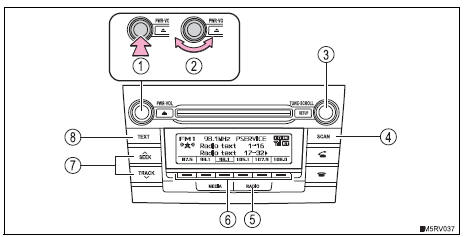
- Power
- Volume
- Adjusting the frequency
- Scanning for receivable stations
- Am/fm mode button
- Station selectors
- Seeking the frequency
- Displaying text message
Setting station presets
- Search for the desired stations by turning the ¢Â§tune¢escroll¢¸
knob or pressing
 on the ¢Â§seek/track¢¸ button.
 - Press and hold one of
 the station is to
be set to until you hear a beep.
Scanning radio stations
Scanning the preset radio stations
- Press and hold the “scan� button until you hear a beep.
Preset stations will be played for 5 seconds each.
To cancel, press the button again.
- When the desired station is reached, press the button again.
Scanning all the radio stations within range
- Press the “scan� button.
All the stations with reception will be played for 5 seconds each.
To cancel, press the button again.
- When the desired station is reached, press the button again.
Switching the display
Press the “text� button to display or hide the radio texts.
If there are continuing texts,
 is displayed.
Press the button to display the remaining texts.
When the battery is disconnected
Stations presets are erased.
Reception sensitivity
- Maintaining perfect radio reception at all times is difficult due to the continually changing position of the antenna, differences in signal strength and surrounding objects, such as trains, transmitters, etc.
- The radio antenna is mounted on the roof. The antenna can be removed from the base by turning it.
Notice
To prevent damage, remove the antenna in the following cases
- The antenna will touch the ceiling of a garage.
- A cover will be put on the roof.
 Audio system types
Vehicles with an entune premium audio with navigation
Refer to the “navigation and multimedia system owner’s
manual�.
Vehicles with an entune audio plus
Refer to the “navigation ...
 Using the cd player
Power
Volume
Cd eject
Selecting a track or displaying
track list
Searching playback
Random play or back button
Repeat play
Fast-forwarding or rewinding
Changing the audio sour ...
Other materials:
Engine control system malfunction
Description
If a malfunction in the engine control system is detected, the operations of
vsc and trc are prohibited
by the fail-safe function. When the signals from the engine are input normally,
the fail-safe is canceled and
the dtc is not stored.
Inspection procedure
Check harn ...
Footwell light
On-vehicle inspection
Inspect footwell light
Connect the battery's positive (+) lead to terminal 2
and the negative (-) lead to terminal 1, then check
that the light comes on.
Ok:
light comes on.
If the result is not as specified, replace the light. ...
Door lock position circuit
Description
This circuit detects the state of the door lock detection sensor and sends it
to the main body ecu.
Wiring diagram
Inspection procedure
Read value of intelligent tester (door lock position)
Connect the intelligent tester (with can vim) to the
dlc3.
Turn the ignitio ...
