
Toyota RAV4 (XA40) 2013-2018 Owners Manual: Turn signal lever
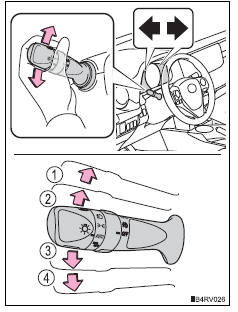
Operating instructions
- Right turn
- Lane change to the right (move the lever partway and release it) the right hand signals will flash 3 times.
- Lane change to the left (move the lever partway and release it) the left hand signals will flash 3 times.
- Left turn
Turn signals can be operated when
- Vehicles without a smart key system
The engine switch is in the “on� position.
- Vehicles with a smart key system
The engine switch is in ignition on mode.
If the indicator flashes faster than usual
Check that a light bulb in the front or rear turn signal lights has not burned out.
If the turn signals stop flashing before a lane change has been performed
Operate the lever again.
To discontinue flashing of the turn signals during a lane change
Operate the lever in the opposite direction.
Customization
The setting of the turn signals flash during a lane change can be changed.
 Selecting shift ranges in the s position
To enter s mode, shift the shift lever to s. Shift ranges can be selected
by operating the shift lever, allowing you to drive in the shift range of
your choosing. The shift range can be selected by ...
 Parking brake
Sets the parking brake
Fully pull the parking brake while
depressing the brake pedal.
Releases the parking brake
Slightly raise the lever and lower it
completely while pressing the butt ...
Other materials:
Opening the back door from outside the vehicle
Back door opener
Vehicles without a power
back door
Raise the back door while
pressing up the back door
opener switch.
Vehicles with a power back
door
When the back door is
unlocked: press the back door
opener switch.
When the back door is locked
(vehicles with a smart key ...
Rear no. 1 Seat assembly (for lh side)
Components
...
Using the aux port
This port can be used to connect a portable audio device and listen
to it using the vehicle’s speakers.
Open the cover and connect
the portable audio device.
Press the “media� button repeatedly until “aux� is displayed.
Silencing a sound
Press
(mute).
To cancel, p ...
