
Toyota RAV4 (XA40) 2013-2018 Owners Manual: When closing the back door
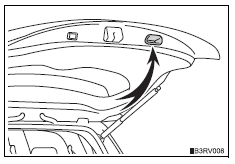
Lower the back door using the back door handle.
- Vehicles without a power back door
Make sure to push the back door down from the outside to close it.
- Vehicles with a power back door
The back door closing assist will activate, and the back door will fully close automatically.
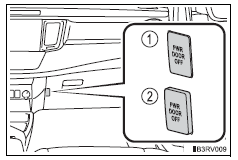
Canceling the power back door system (vehicles with a power back door)
Turn the main switch in the glove box off to disable the power back door system.
- Inoperative
- Operative
 Power back door switch (vehicles with a power back door)
Pressing the switch closes the
back door automatically. (A
buzzer sounds.)
Pressing the switch while the back
door is opening/closing stops the
operation. Pressing the switch
again will reverse ...
 Adjusting the open position of the back door (vehicles with a power back door)
The open position of the power back door can be adjusted.
Open the back door, and adjust it to the desired position.
Press and hold the power back door switch on the back door until
the buzzer ...
Other materials:
Rear occupant classification sensor rh collision detection
Description
Dtc b1788 is output when the occupant classification ecu receives a collision
detection signal sent by
the rear occupant classification sensor rh when an accident occurs.
Dtc b1788 is also output when the front seat rh is subjected to a strong impact,
even if an actual
acci ...
Srs airbags
The srs airbags inflate when the vehicle is subjected to certain
types of severe impacts that may cause significant injury to the
occupants. They work together with the seat belts to help reduce
the risk of death or serious injury.
Srs front airbags
Srs driver airbag/front passenger airb ...
Fuel injector
Components
Removal
Discharge fuel system pressure
Caution:
Discharge fuel system pressure
procedures must be performed before
disconnecting any part of the fuel system.
After performing the discharge fuel system
pressure procedures, pressure will remain in
the fuel line ...
