
Toyota RAV4 (XA40) 2013-2018 Service Manual: Installation
- Install crankshaft position sensor
Notice:
Make sure that the o-ring is not cracked or jammed when installing it.
- Apply a light coat of engine oil to the o-ring of the sensor.
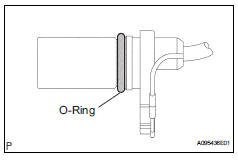
- Install the sensor with the bolt.
Torque: 9.0 N*m (90 kgf*cm, 80 in.*Lbf)
- Install the wire harness clamp.
- Install the connector clamp.
- Connect the sensor connector.
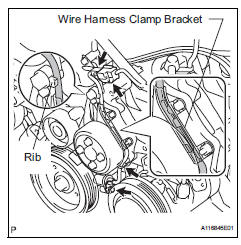
- Confirm that the wire harness of the sensor is secured to the wire harness clamp bracket through the back of the rib of the timing chain cover.
- Install generator assembly
- Install the generator to the vehicle (see page ch- 15).
- Connect cable to negative battery terminal
- Check for engine oil leakage
 Inspection
Inspect crankshaft position sensor
Measure the resistance of the sensor.
Standard resistance
Notice:
Cold and hot mean the temperature of the coils
themselves. Cold is from -10 to ...
 Engine coolant temperature sensor
Components
...
Other materials:
Gauges and meters (with 7- inch multi-information
display)
The meters display various drive information.
Meter display
The display of the speedometer can be selected from two types,
analog or digital.
Analog speedometer
The units used on the meter and display may differ depending on the target
region.
Tachometer
Displays the engine speed in revolutions ...
Installation
Install water pump assembly
Remove any old seal packing material from the
contact surface.
Apply a continuous line of seal packing as shown in
the illustration.
Seal packing:
toyota genuine seal parking black, three
bond 1207b or equivalent
Standard seal diameter:
2.2 To 2. ...
Installation
Hint:
Use the same procedures for the rh side and lh side.
The procedures listed below are for the lh side.
Install rear stabilizer bush
Install the 2 bushes.
Hint:
Install each bush to the outer side of the bush
stopper on each stabilizer bar.
Install each bush with ...
