
Toyota RAV4 (XA40) 2013-2018 Service Manual: Problem symptoms table (2005/11-2006/01)
Hint:
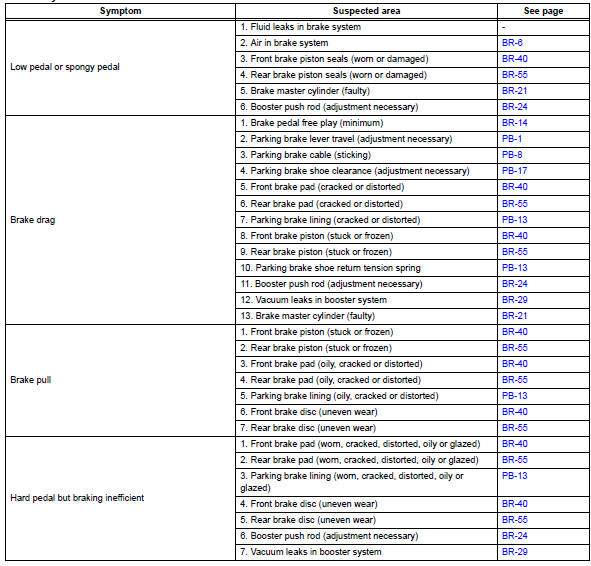
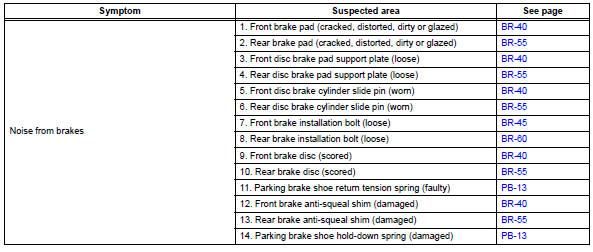
Use the table below to help determine the cause of the problem symptom. The potential causes of the symptoms are listed in order of probability in the "suspected area" column of the table. Check each symptom by checking the suspected areas in the order they are listed. Replace parts as necessary.
 Precaution
Notice:
Take extra care to replace each part properly. Improper
installation or repair could affect the performance of
the brake system and cause a driving hazard.
It is very important to ke ...
 Problem symptoms table (2006/01- )
Hint:
Use the table below to help determine the cause of the
problem symptom. The potential causes of the symptoms are
listed in order of probability in the "suspected area" column
of th ...
Other materials:
Moon roof
Use the overhead switches
to open and close the moon
roof and tilt it up and down.
Operating the moon roof
â– Opening and closing
Opens the moon roof*
The moon roof stops slightly before
the fully open position to reduce
wind noise.
Press the switch again to fully open
the moon roof.
Close ...
Front console illumination
On-vehicle inspection
Inspect front console illumination
Connect the battery's positive (+) lead to terminal 1
and the negative (-) lead to terminal 2, then check
that the light comes on.
Ok:
light comes on.
If the result is not as specified, replace the front
console illumin ...
Transmitter id
Description
Hint:
It is necessary to perform the procedure to identify the tire pressure
monitor valve that is malfunctioning
because it cannot be identified by the output dtc.
Inspection procedure
Notice:
It is necessary to register an id code after replacing the tire pressure
wa ...
