
Toyota RAV4 (XA40) 2013-2018 Owners Manual: The keys
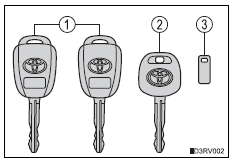
The following keys are provided with the vehicle.
- Vehicles without a smart key system (type a)
- Master keys
Operating the wireless remote control function
- Valet key
- Key number plate
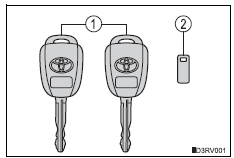
- Vehicles without a smart key system (type b)
- Master keys
Operating the wireless remote control function
- Key number plate
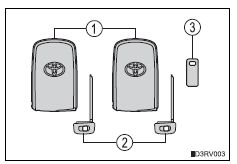
- Vehicles with a smart key system
- Electronic keys
- Operating the smart key system
- Operating the wireless remote control function
- Mechanical keys
- Key number plate
 Key information
...
 Using the mechanical key (vehicles with a smart key system)
To take out the mechanical key,
push the release button and take
the key out.
The mechanical key can only be
inserted in one direction, as the
key only has grooves on one side.
If the key cann ...
Other materials:
Installation
Install ignition switch assembly
Install the ignition switch with the 2 screws.
Install the ignition key cylinder light connector.
Install the ignition switch connector.
Install steering column cover lower
Attach the 4 claws to install the steering column
l ...
Installation
Install no. 2 Radiator grille lower
Install the radiator grille and attach the 16 claws.
Install no. 1 Radiator grille lower
Install the radiator grille and attach the 16 claws.
Install radiator grille
Install the radiator grille with the 6 claws.
...
Open in one side of can branch line
Description
If 2 or more ecus and/or sensors do not appear on the intelligent tester's
"bus check" screen via the
can vim, one side of the can branch wire may be open. (One side of the canh
[branch wire] /canl
[branch wire] of the ecu and/or sensor is open.)
Wiring diagram
...
