
Toyota RAV4 (XA50) 2019-2026 Owners Manual: Turn signal lever
Operating instructions
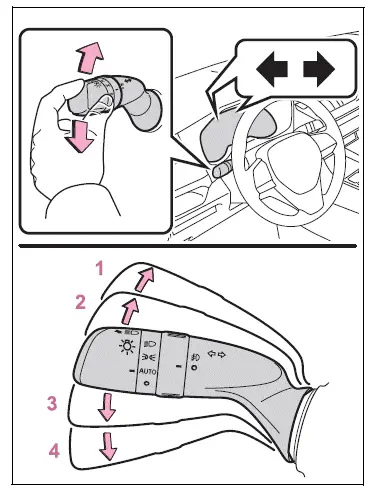
- Right turn
- Lane change to the right (move the lever partway and release it)The right hand signals will flash 3 times.
- Lane change to the left
(move the lever partway and
release it)
The left hand signals will flash 3 times. - Left turn
â– Turn signals can be operated when
The engine switch is in ON.
â– If the indicator flashes faster than usual
Check that a light bulb in the front or rear turn signal lights has not burned out.
â– If the turn signals stop flashing before a lane change has been performed
Operate the lever again.
â– To discontinue flashing of the turn signals during a lane change
Operate the lever in the opposite direction.
 Automatic transmission
Select the shift position
depending on your purpose
and situation.
Shift position purpose
and functions
P - Parking the vehicle/
starting the engine
R - Reversing
N - Neutral
D - Normal driving*1
S&nb ...
 Parking brake
The parking brake can be
set or released automatically
or manually.
In automatic mode, the
parking brake can be set or
released automatically
according to shift lever
operation. Also, even in
automat ...
Other materials:
Ventilation valve
Components
Removal
Remove no. 1 Engine cover (see page em-22)
Remove ventilation valve sub-assembly
Disconnect the ventilation hose from the ventilation
valve.
Using a 22 mm deep socket wrench, remove the
ventilation valve.
Inspection
Inspect ventilation val ...
Passenger airbag on / off indicator circuit malfunction
Description
The passenger airbag on / off indicator circuit consists of the center airbag
sensor and the heater
control panel*1 or *2.
This circuit indicates the operation condition of the front passenger airbag,
the front passenger side airbag
and passenger side seat belt pretensioner ...
Diagnosis system
Description
The occupant classification ecu controls the functions of
the occupant classification system on the vehicle. Data
of the occupant classification system can be read in the
data link connector 3 (dlc3) of the vehicle. When the
system seems to be malfunctioning, use the intelligen ...
