
Toyota RAV4 (XA40) 2013-2018 Owners Manual: Adjusting the position of and opening and closing the air outlets
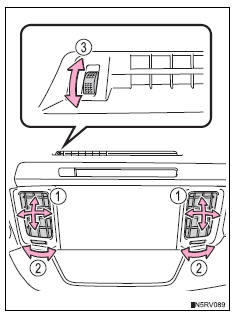
Front center outlets
- Direct air flow to the left or right, up or down.
- Turn the knobs to open or close the vents.
- Turn the knob to open or close the vent for rear seat occupants.
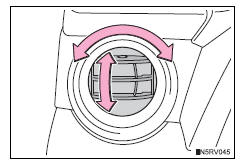
М
Direct air flow to the left or right, up or down.
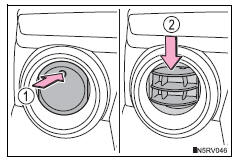
- Open the vent.
- Close the vent.
Operation of the air conditioning system in eco drive mode
In eco drive mode, the air conditioning system is controlled as follows to prioritize fuel efficiency:
- Engine speed and compressor operation controlled to restrict heating/cooling capacity
- Fan speed restricted when automatic mode is selected
To improve air conditioning performance, perform the following operations:
- Adjust the fan speed
- Turn off eco drive mode
Using automatic mode
Fan speed is adjusted automatically according to the temperature setting and the ambient conditions.
Therefore, the fan may stop for a while until warm or cool air is ready to flow
immediately after 
is pressed.
Fogging up of the windows
The windows will easily fog up when the humidity in the vehicle is high.
Turning  on
on
will dehumidify the air from the outlets and defog the windshield
effectively.
- If you turn

off, the windows may fog up more easily. - The windows may fog up if the recirculated air mode is used.
Outside/recirculated air mode
- When driving on dusty roads such as tunnels or in heavy traffic, set the outside/ recirculated air mode button to the recirculated air mode. This is effective in preventing outside air from entering the vehicle interior. During cooling operation, setting the recirculated air mode will also cool the vehicle interior effectively.
- Outside/recirculated air mode may automatically switch depending on the temperature setting or the inside temperature.
When the outside temperature exceeds 75„af (24„ac) and the air conditioning system is on
- In order to reduce the air conditioning power consumption, the air conditioning system may switch to recirculated air mode automatically. This may also reduce fuel consumption.
- Recirculated air mode is selected as a default mode when the engine switch is in the “on� position (vehicles without a smart key system) or ignition on mode (vehicles with a smart key system)
- It is possible to switch to outside air mode at any time by pressing
 .
.
Micro dust and pollen filter
In order to prevent the windshield from fogging up when the outside air is cold, the following may occur:
- Outside air mode does not switch to recirculated air mode.
- The dehumidification function operates.
- The operation cancels after approximately 1 minute.
- In rainy weather, the windows may fog up. Press
 .
. - In extremely humid weather, the windows may fog up.
- The pollens are filtered out even if the micro dust and pollen filter is turned off.
When the outside temperature falls to nearly 32„af (0„ac)
- The dehumidification function may not operate even when
 is pressed.
Ventilation and air conditioning odors
- To let fresh air in, set the air conditioning system to the outside air mode.
- During use, various odors from inside and outside the vehicle may enter into and accumulate in the air conditioning system. This may then cause odor to be emitted from the vents.
- To reduce potential odors from occurring:
- It is recommended that the air conditioning system be set to outside air mode prior to turning the vehicle off.
- The start timing of the blower may be delayed for a short period of time immediately after the air conditioning system is started in automatic mode.
Air conditioning filter
Customization
Settings (e.G. Outside/recirculated air mode) can be changed.
Caution
To prevent the windshield from fogging up
Do not use during cool air operation in extremely humid weather. The difference between the temperature of the outside air and that of the windshield can cause the outer surface of the windshield to fog up, blocking your vision.
Notice
To prevent battery discharge
Do not leave the air conditioning system on longer than necessary when the engine is off.
 Micro dust and pollen filter mode button
Operates micro dust and pollen filter
mode on/off.
Outside air mode switches to recirculated
air mode. Pollen is
removed from the air and the air
flows to the upper part of the body.
Usually t ...
 Rear window and outside rear view mirror defoggers
These features are used to defog the rear window, and to
remove raindrops, dew and frost from the outside rear view mirrors
(if equipped).
Vehicles with a manual air conditioning system
On/off
Th ...
Other materials:
Problem symptoms table
Hint:
Use the table below to help determine the cause of the
problem symptom. The potential causes of the symptoms
are listed in order of probability in the "suspected area"
column of the table. Check each symptom by checking the
suspected areas in the order they are listed. Re ...
Inspection
Inspect rear stabilizer link assembly lh
As shown in the illustration, move the ball joint stud
back and forth 5 times before installing the nut.
Using a torque wrench, turn the nut continuously at
a rate of 3 to 5 seconds per turn and take the torque
reading on the fifth turn.
...
If a warning light turns
on or a warning buzzer
sounds
Calmly perform the following actions if any of the warning lights
comes on or flashes. If a light comes on or flashes, but then
goes off, this does not necessarily indicate a malfunction in the
system. However, if this continues to occur, have the vehicle
inspected by your toyota dealer.
Stop t ...
