
Toyota RAV4 (XA40) 2013-2018 Service Manual: Camshaft position sensor
Components
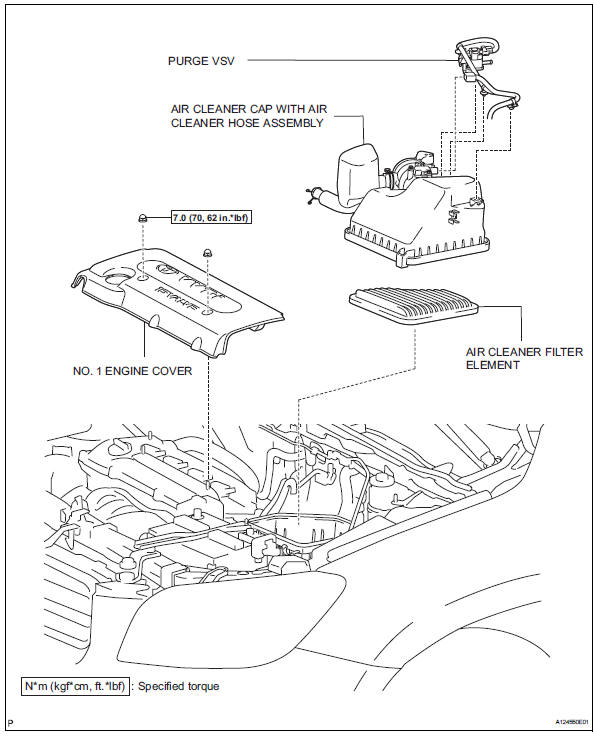
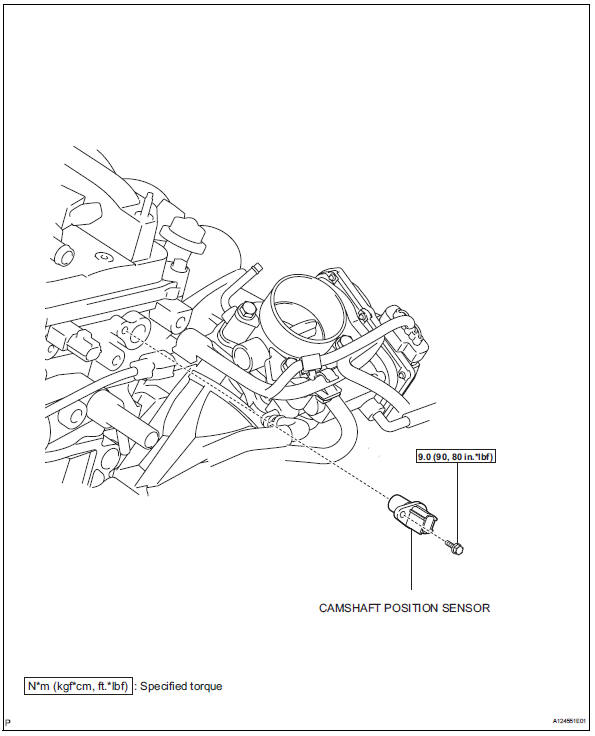
 Installation
Install camshaft timing oil control valve
assembly
Apply a light coat of engine oil to the o-ring of the oil
control valve.
Install the oil control valve with the bolt.
Torque: 9 ...
 Removal
Disconnect cable from negative battery
terminal
Caution:
Wait at least 90 seconds after disconnecting the
cable from the negative (-) battery terminal to
prevent airbag and seat belt preten ...
Other materials:
Transmitter id
Description
Hint:
It is necessary to perform the procedure to identify the tire pressure
monitor valve that is malfunctioning
because it cannot be identified by the output dtc.
Inspection procedure
Notice:
It is necessary to register an id code after replacing the tire pressure
wa ...
On-vehicle inspection
Hint:
When pressing the switch for 0.3 Seconds or less, the roof
glass moves but auto operation does not operate.
Check auto operation
Turn the ignition switch on.
When the roof glass is fully closed, press the slide
open switch for 0.3 Seconds or more. Check that
the roof glass au ...
Installation
Install drive plate sub-assembly
Clean the 8 bolts and 8 bolt holes.
Apply adhesive to 2 or 3 threads of the 8 bolts.
Adhesive:
Toyota genuine adhesive 1342, three bond
1342 or equivalent
Using sst, hold the crankshaft.
Sst 09213-54015 (91651-60855), 09330-00021
Instal ...
