
Toyota RAV4 (XA40) 2013-2018 Service Manual: Check mode procedure
Hint:
Intelligent tester only: compared to normal mode, check mode is more sensitive to malfunctions. Therefore, check mode can detect the malfunctions that cannot be detected by normal mode.
Notice:
All the stored dtcs and freeze frame data are erased if:
- The ecm is changed from normal mode to check mode or vice versa;
- Or the ignition switch is turned from on to acc or off while in check mode. Before changing modes, always check and make a note of any dtcs and freeze frame data.
- Check mode procedure (using intelligent tester)
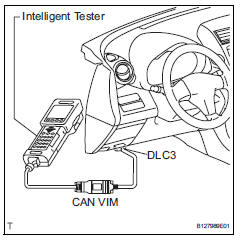
- Check and ensure the following conditions:
- Battery positive voltage 11 v or more.
- Throttle valve fully closed.
- Transmission in the p or n position.
- A/c switch off.
- Turn the ignition switch off.
- Connect the intelligent tester to the dlc3.
- Turn the ignition switch on.
- Turn the tester on.
- Select the following menu items: diagnosis / enhanced obd ii/ check mode.
- Switch the ecm from normal mode to check mode.
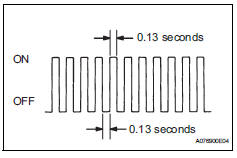
Make sure the mil flashes as shown in the illustration.- Start the engine.
- Make sure the mil turns off.
- Simulate the conditions of the malfunction described by the customer.
- Check dtcs and freeze frame data using the tester.
 Freeze frame data
Description
Freeze frame data records the engine conditions (fuel
system, calculated load, engine coolant temperature,
fuel trim, engine speed, vehicle speed, etc.) When a
malfunction is dete ...
 Fail-safe chart
If any of the following dtcs are set, the ecm enters fail-safe
mode to allow the vehicle to be driven temporarily.
Hint:
*: The vehicle can be driven slowly when the accelerator
pedal is depre ...
Other materials:
Blower resistor
On-vehicle inspection
Inspect blower motor control
Measure the resistance of the blower resistor.
Standard resistance
If the resistance is not as specified, replace the
blower motor control. ...
Programming HomeLink
â– Before programming
HomeLink
During programming, it is possible
that garage doors,
gates, or other devices may
operate. For this reason,
make sure that people and
objects are clear of the
garage door or other devices
to prevent injury or other
potential harm.
It is recommended that a n ...
Terminals of ecm
Check ecm
Disconnect the a9 and b30 connectors.
Measure the voltage and resistance of the wire
harness side connectors.
If the result is not as specified, there may be a
malfunction on the wire harness side. ...
