
Toyota RAV4 (XA40) 2013-2018 Owners Manual: Defogging the windshield
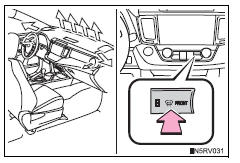
Press  .
.
The dehumidification function operates and fan speed increases.
Set the outside/recirculated air mode button to outside air mode if the recirculated air mode is used.
(It may switch automatically.) To defog the windshield and the side windows early, turn the air flow and temperature up.
To return to the previous mode,
press  again when the windshield
is defogged.
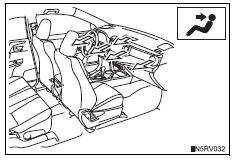
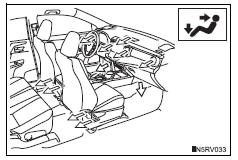
Air outlets and air flow
Upper body
Upper body and feet
Feet
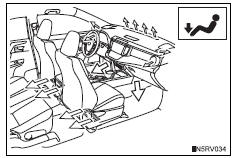
Feet and windshield
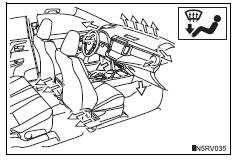
If the recirculated air mode is used, it will automatically switch to the outside air mode.
Switching between outside air and recirculated air modes
Press  .
.
The mode switches between outside air mode (the indicator is off) and
recirculated air mode (the indicator is on) each time
 is pressed.
 Adjusting the settings manually
To adjust the fan speed, press
on
to increase the fan
speed and to
decrease the fan speed.
Press to turn the fan off.
To adjust the temperature sett ...
 Micro dust and pollen filter mode button
Operates micro dust and pollen filter
mode on/off.
Outside air mode switches to recirculated
air mode. Pollen is
removed from the air and the air
flows to the upper part of the body.
Usually t ...
Other materials:
Data list
Hint:
By reading the data list displayed on an intelligent
tester, values can be checked, including those of the
switches, sensors, and actuators, without removing any
parts. Reading the data list as the first step of
troubleshooting is one method of shortening diagnostic
time.
Notice:
In th ...
Disassembly
Hint:
Use the same procedures for the rh side and lh side.
The procedures listed below are for the lh side.
Remove no. 1 Rear seat reclining cover lh
Remove the 2 screws.
Using a screwdriver, detach the 5 claws and remove
the cover.
Hint:
Tape the screwdriver tip before ...
Assist map number un-writing
Description
The power steering ecu outputs this dtc when it determines that the assist
map is not written in the
ecu.
Hint:
The assist map data is written in the power steering ecu to control assisting
power.
The assist map has 3 types. Select an assist map according to the vehicle
...
