
Toyota RAV4 (XA40) 2013-2018 Service Manual: How to proceed with troubleshooting
Hint:
Perform troubleshooting in accordance with the following flowchart.
*: Use the intelligent tester.
- Vehicle brought to workshop

- Inspect battery voltage
Standard voltage: 11 to 14 v
If the voltage is below 11 v, recharge or replace the battery before proceeding.

- Problem symptom confirmation

- Check can communication system*
- Check for dtc (see page ps-11).
Result 
Hint:
- When any can communication system dtcs are output, perform troubleshooting on the can communication system first.
- When communication to the power steering ecu is not established through the intelligent tester, inspect terminals sil of the dlc3 and the power steering ecu, and the ig circuit of the power steering ecu.


- Check dtc*
- Check for dtc (see page ps-11).
Result 


- Problem symptoms table
Result 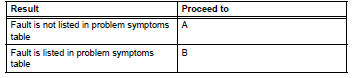


- Overall analysis and troubleshooting*
- Terminals of ecu (see page ps-8).
- Data list / active test (see page ps-14).

- Repair or replace

- Confirmation test

End
 System description
Description
The eps (electronic power steering) system generates
torque through the operation of the motor and the
reduction gear installed on the column shaft in order to
assist steering eff ...
 Problem symptoms table
Hint:
Use the table below to help determine the cause of the
problem symptom. The potential causes of the symptoms are
listed in order of probability in the "suspected area" column of
t ...
Other materials:
Contact/call history
settings
The contact can be transferred from a bluetooth® phone to the system.
The contact also can be added, edited and deleted.
The call history can be deleted and contact and favorites can be
changed.
Display the “phone/message settings� screen.
Select “contact/call history settings� ...
Rear axle hub and bearing
Components
On-vehicle inspection
Remove rear wheel
Disconnect rear drive shaft assembly lh
(for 4wd)
Disconnect the drive shaft (see page ds-69).
Remove rear disc brake cylinder assembly
lh (see page br-55)
Remove rear disc (see page br-57)
Check bearing backlash a ...
Srs warning light remains on
Description
The srs warning light is located on the combination meter.
When the srs is normal, the srs warning light comes on for approximately 6
seconds after the ignition
switch is turned from off to on, and then goes off automatically.
If there is a malfunction in the srs, the srs warni ...
