
Toyota RAV4 (XA40) 2013-2018 Owners Manual: Manual air conditioning system
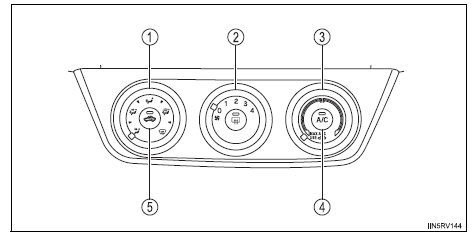
- Air outlet selector dial
- Fan speed control dial
- Temperature control dial
- Cooling and dehumidification function on/off button
- Outside/recirculated air mode button

 Adjusting the settings
To adjust the fan speed, turn the fan speed control dial clockwise
(increase) or counterclockwise (decrease).
Turning the dial to “0� turns off the fan.
To adjust the temperature setti ...
Other materials:
Unlocking and locking the doors
Front doors
Grip the driver’s door handle to
unlock the door. Grip the passenger’s
door handle to unlock all the
doors.*
Make sure to touch the sensor on
the back of the handle.
The doors cannot be unlocked for
3 seconds after the doors are
locked.
*: The door unlock settings can be ...
Removal (2005/11-2006/01)
Remove front wheel
Drain automatic transaxle fluid
Drain the automatic transaxle fluid for u140f (see
page ax-147).
Drain the automatic transaxle fluid for u241e (see
page ax-146).
Remove front axle hub nut (see page ah-6)
Disconnect front speed sensor lh
Disconnect th ...
Preparations to
use wireless
communication
The following can be performed using bluetooth® wireless communication:
A portable audio player can be operated and listened to via
audio system
Hands-free phone calls can be made via a cellular phone
In order to use wireless communication, register and connect a
bluetooth® device by p ...
