
Toyota RAV4 (XA40) 2013-2018 Service Manual: Outside moulding
Components
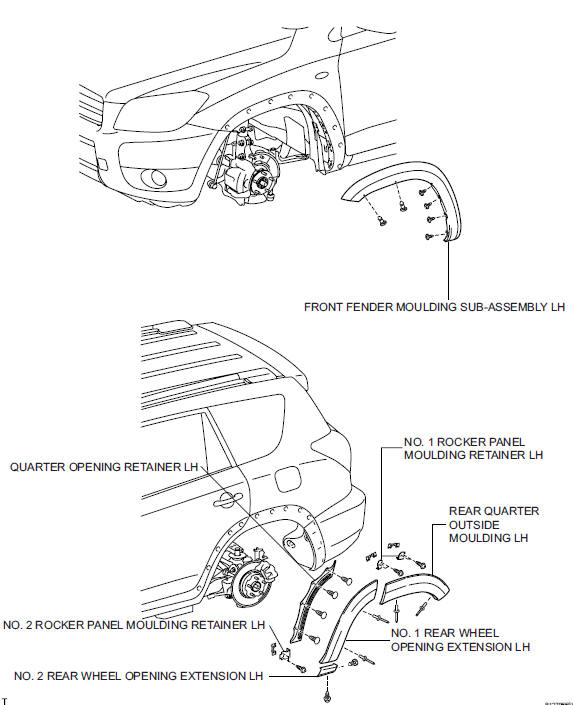
 Installation
Hint:
Use the same procedures for the rh side and lh side.
The procedures listed below are for the lh side.
When replacing the clip, heat the clip and body using a
heat light.
Standard he ...
 Removal
Hint:
Use the same procedures for the rh side and lh side.
The procedures listed below are for the lh side.
When removing the moulding, heat the vehicle body and
moulding using a heat light. ...
Other materials:
Air outlets and air flow
Upper body
Upper body and feet
Feet
Feet and windshield
Switching between outside air and recirculated air modes
Press .
The mode switches between outside air mode (indicator off) and recirculated
air mode (indicator on) each time
is pressed.
Adjusting the pos ...
Compressor solenoid circuit (2006/01- )
Description
In this circuit, the compressor receives a refrigerant compression demand
signal from the air conditioning
amplifier. Based on this signal, the compressor changes the degree of
refrigerant compression.
Hint:
*: Compressor and pulley for 2az-fe, compressor and magnetic clu ...
Parts location
System diagram
Hint:
The abs and traction actuator (skid control ecu)
detects and stores steering sensor and yaw rate
sensor dtcs and performs dtc communication by
receiving information from the steering sensor and
yaw rate sensor.
The ecm uses the can communication sy ...
