
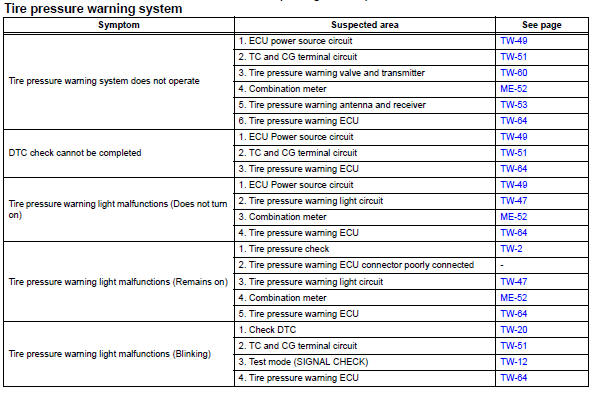
Toyota RAV4 (XA40) 2013-2018 Service Manual: Problem symptoms table
Hint:
- Use the table below to help determine the cause of the problem symptom. The potential causes of the symptoms are listed in order of probability in the "suspected area" column of the table. Check each symptom by checking the suspected areas in the order they are listed. Replace parts as necessary.
- Inspect the fuses and relays related to this system before inspecting the suspected areas below.
 Test mode procedure
Test mode check
Hint:
When entering the test mode, the tire pressure
warning ecu sets all the test dtcs first. After
completing the test mode for each inspection item, the
dtcs that ar ...
 Terminals of ecu
Check tire pressure warning ecu
Disconnect the e56 ecu connector.
Measure the voltage and resistance of the wire
harness side connector.
If the result is not as specified, ther ...
Other materials:
Steering angle sensor zero point malfunction
Description
The skid control ecu learns the steering sensor zero point every time the
ignition switch is turned on and
the vehicle is driven at 35 km/h (22 mph) or more for approximately 5 seconds.
The ecu also stores the
previous zero point.
If front wheel alignment or the steering wh ...
Power mirror control system
Parts location
System diagram
System description
The outer mirror switch controls the outer rear view mirror lh
and rh.
Problem symptoms table
Hint:
Use the table below to help determine the cause of the
problem symptom. The potential causes of the symptoms are
listed in order of pr ...
Mass air flow circuit range / performance problem
Description
Refer to dtc p0100 (see page es-86).
Monitor description
The maf meter is a sensor that measures the amount of air flowing through the
throttle valve. The ecm
uses this information to determine the fuel injection time and to provide an
appropriate air-fuel ratio. Inside
...
