
Toyota RAV4 (XA40) 2013-2018 Service Manual: Problem symptoms table
Hint:
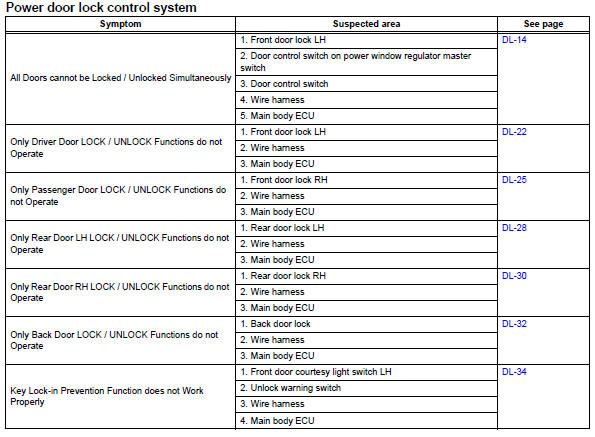
Use the table below to help determine the cause of the problem symptom. The potential causes of the symptoms are listed in order of probability in the "suspected area" column of the table. Check each symptom by checking the suspected areas in the order they are listed. Replace parts as necessary.
 Customize parameters
Customizing function with intelligent
tester (reference)
Hint:
The following item can be customized.
Notice:
When the customer requests a change in a
function, first make sure that the ...
 Terminals of ecu
Check instrument panel junction block (main body ecu)
Disconnect the ib and ie junction block connectors.
Measure the voltage and resistance of the wire
harness side connectors.
...
Other materials:
Correct driving posture
Adjust the angle of the seatback
so that you are sitting
straight up and so that you do
not have to lean forward to
steer.
Adjust the seat so that you can
depress the pedals fully and so
that your arms bend slightly at
the elbow when gripping the
steering wheel.
Lock the head ...
Installation
Install throttle body
Install a new gasket onto the intake manifold.
Install the throttle body and fuel pipe clamp with the
4 bolts.
Torque: 30 n*m (305 kgf*cm, 22 ft.*Lbf)
Connect the fuel tube into the clamp.
Connect the wire harness clamp.
Connect the throttle posi ...
Driving in vehicle-to-vehicle distance control mode
This mode employs a radar to detect the presence of vehicles up to
approximately 328 ft. (100 m) ahead, determines the current vehicle-to-
vehicle following distance, and operates to maintain a suitable following
distance from the vehicle ahead. The desired vehicle-to-vehicle
distance can also be se ...
