
Toyota RAV4 (XA40) 2013-2018 Service Manual: Ecu power source circuit
Description
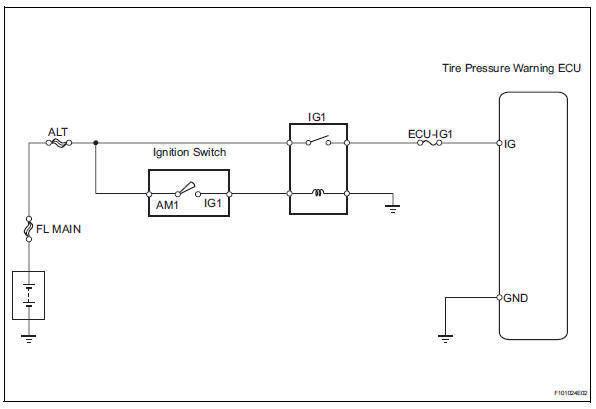
This is the power source for the tire pressure warning ecu.
Wiring diagram
Inspection procedure
Notice:
It is necessary to register an id code after replacing the tire pressure monitor valve and/or the tire pressure warning ecu (see page tw-9).
- Inspect fuse (ecu-ig1)
- Remove the ecu-ig1 fuse from the instrument panel junction block.
- Measure the resistance of the fuse.
Standard resistance:
below 1 


- Inspect ig1 relay
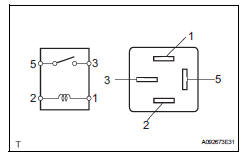
- Remove the ig1 relay from the instrument panel junction block.
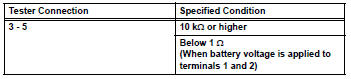
- Measure the resistance of the relay.
Standard resistance


- Inspect wire harness (ecu - battery and body ground)
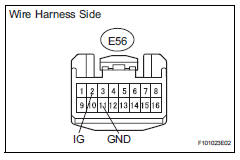
- Disconnect the e56 ecu connector.
- Measure the voltage of the wire harness side connector.
Standard voltage 
- Measure the resistance of the wire harness side connector.
Standard resistance 


Proceed to next circuit inspection shown in problem symptoms table
 Tire pressure warning light circuit
Description
If the tire pressure warning ecu detects trouble, the tire pressure warning
light turns on and tire pressure
monitor is canceled at the same time. At this time, the ecu records a dtc i ...
 Tire pressure warning receiver (w/ antenna)
Components
...
Other materials:
Washer motor
Components
Removal
Disconnect cable from negative battery
terminal
Caution:
Wait at least 90 seconds after disconnecting the
cable from the negative (-) battery terminal to
prevent airbag and seat belt pretensioner activation.
Remove washer inlet sub-assembly
Remove th ...
Data list / active test
Read data list
Hint:
Using the intelligent tester's data list allows switch,
sensor, actuator and other item values to be read without
out removing any parts. Reading the data list early in
troubleshooting is one way to save time.
Connect the intelligent tester (with can vim) to the
...
Terminals of ecu
Check occupant classification ecu
Measure the voltage of the connector.
...
