
Toyota RAV4 (XA40) 2013-2018 Service Manual: General information
A large number of ecu controlled systems are used in the rav4. In general, ecu controlled systems are considered to be very intricate, requiring a high level of technical knowledge to troubleshoot. However, most problem checking procedures only involve inspecting the ecu controlled system's circuits one by one. An adequate understanding of the system and a basic knowledge of electricity is enough to perform effective troubleshooting, accurate diagnoses and necessary repairs.
For using intelligent tester
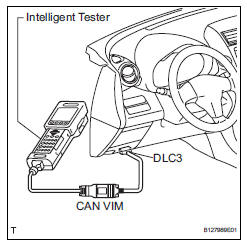
Connect the cable of the intelligent tester to the dlc3, turn the ignition switch on and attempt to use the tester. If the display indicates that a communication error has occurred, there is a problem either with the vehicle or with the tester.
* If communication is normal when the tester is connected to another vehicle, inspect the dlc3 of the original vehicle.
* If communication is still not possible when the tester is connected to another vehicle, the problem may be in the tester itself. Consult the service department listed in the tester's instruction manual.


Other materials:
Front door courtesy switch
Components
Removal
Hint:
Use the same procedures for the rh and lh sides.
The procedures listed below are for the lh side.
Disconnect cable from negative battery
terminal
Caution:
Wait at least 90 seconds after disconnecting the
cable from the negative (-) battery terminal t ...
Tire and wheel system
Inspection
Inspect tire
Check the tires for wear and proper inflation
pressure.
Standard cold tire inflation pressure:
220 kpa (2.2 Kgf/cm2, 32 psi)
Using a dial indicator, check the runout of the tires.
Standard tire runout:
1.0 Mm (0.039 In.) Or less
Rotate tire
...
Terminals of ecu (2005/11-2006/01)
Check air conditioning amplifier
Measure the voltage and resistance of the
connectors.
Hint:
Check from the rear of the connector while it is
connected to the air conditioning amplifier.
using an oscilloscope, check waveform 1.
Can communication signal
Hint:
...
