
Toyota RAV4 (XA40) 2013-2018 Service Manual: Headlight dimmer switch
Precaution
- Precaution for vehicle with srs
- Some procedures in this section may affect the supplemental restraint system (srs). Prior to performing the procedures, read the srs section's "precaution" (see page rs-1).
Components
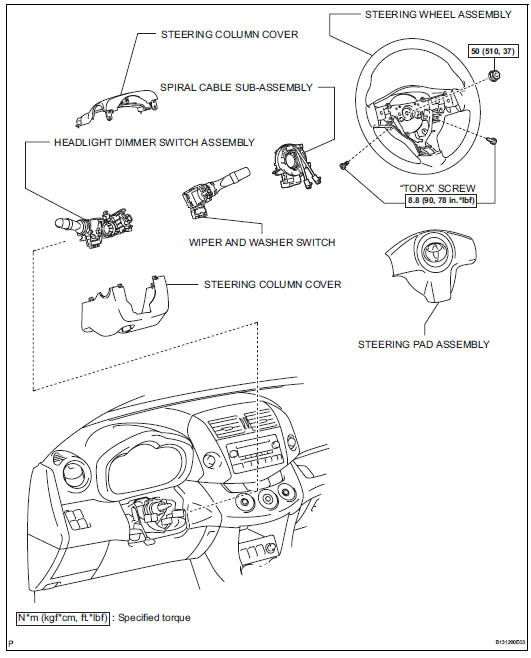
Removal
- Disconnect cable from negative battery terminal
Caution:
Wait at least 90 seconds after disconnecting the cable from the negative (-) battery terminal to prevent airbag and seat belt pretensioner activation.
- Place front wheels facing straight ahead
- Remove steering pad assembly (see page rs- 336)
- Remove steering wheel assembly (see page sr-12)
- Remove steering column cover (see page sr-12)
- Remove spiral cable sub-assembly (see page rs-346)
- Remove wiper and washer switch (see page ww-27)
- Remove headlight dimmer switch assembly
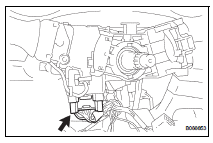
- Disconnect the connector.
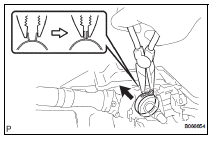
- Using needle-nose pliers, remove the band clamp as shown in the illustration.
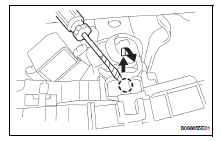
- Using a screwdriver, detach the claws and remove the switch.
Hint:
Tape the screwdriver tip before use.
Inspection
- Inspect headlight dimmer switch assembly
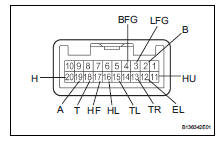
- Measure the resistance of the switch.
Standard resistance:
Light control switch 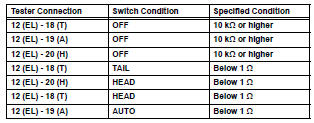
Headlight dimmer switch 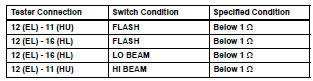
Turn signal switch 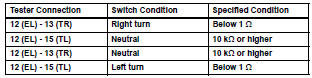
Fog light switch 
If the result is not as specified, replace the dimmer switch assembly.
Installation
- Install headlight dimmer switch assembly
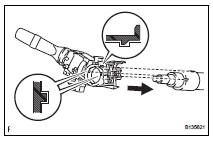
- Attach the claw to install the headlight dimmer switch with the claw as shown in the illustration.
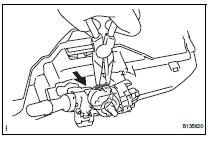
- Install the headlight dimmer switch with the clamp.
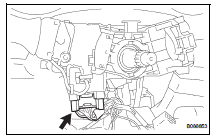
- Connect the connector.
- Install wiper and washer switch assembly (see page ww-29)
- Install spiral cable sub-assembly (see page rs-347)
- Install steering column cover (see page sr- 20)
- Install steering wheel assembly (see page sr-21)
- Place front wheels facing straight ahead
- Inspect steering wheel center point
- Install steering pad assembly (see page rs- 336)
- Connect cable to negative battery terminal
- Inspect steering pad assembly (see page rs- 337)
- Check srs warning light
- Check the srs warning light (see page rs-337).
 Footwell light
On-vehicle inspection
Inspect footwell light
Connect the battery's positive (+) lead to terminal 2
and the negative (-) lead to terminal 1, then check
that the light comes on.
Ok: ...
 Hazard warning switch
Components
Removal
Disconnect cable from negative battery
terminal
Caution:
Wait at least 90 seconds after disconnecting the
cable from the negative (-) battery terminal to
prevent ai ...
Other materials:
Removal
Hint:
Use the same procedures for the rh side and lh side.
The procedures listed below are for the lh side.
Remove front pillar cover sub-assembly upper lh
Using a moulding remover, detach the 3 clips and
remove the pillar cover.
...
Ts and cg terminal circuit
Description
If the vehicle is stationary during sensor check mode, speed sensor
malfunctions cannot be detected. The
vehicle must be driven for speed sensor malfunctions to be detected.
Hint:
Change to sensor check mode by connecting terminals tc and cg of the dlc3,
and turning the ignitio ...
Removal
Caution:
Be sure to read the precautionary notices concerning the
srs airbag system before servicing it (see page rs-1).
Disconnect cable from negative battery
terminal
Caution:
Wait at least 90 seconds after disconnecting the
cable from the negative (-) battery terminal to
prevent air ...
