Toyota RAV4 (XA40) 2013-2018 Service Manual: Identification information
Vehicle identification and serial numbers
- Vehicle identification number
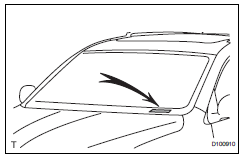
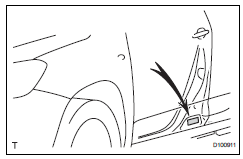
- The vehicle identification number is stamped on the vehicle identification number plate and on the certification label, as shown in the illustrations.
- Vehicle identification number plate
- Certification label
- Engine serial number and transaxle serial number
- The engine serial number is stamped on the cylinder block of the engine and the transaxle serial number is stamped on the housing as shown in the illustrations.
- Engine serial number
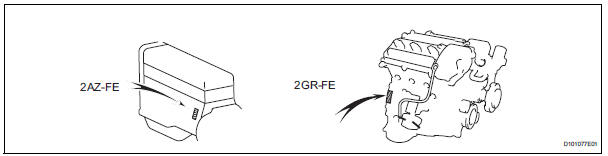
- Transaxle serial number
 How to use this manual
General information
General description
This manual is written in accordance with sae
j2008.
Diagnosis
Removing / installing, replacing, disassembling
/ reassembling, checking an ...

Other materials:
Changing settings of the
pre-collision system
â– Enabling/disabling the pre-collision
system
The pre-collision system can be
enabled/disabled on the
screen of the
multi-information display.
The system is automatically
enabled each time the engine
switch is turned to ON.
If the system is disabled, the
PCS warning light will turn on
and a mes ...
Audio settings
Settings are available for adjusting the radio operation, cover
art, etc.
Screen for audio settings
Press the “setup� button.
Select “audio� on the “setup� screen.
Number of radio presets
select the number of radio
preset stations.
Display cover art on/off
Auto ...
Data list / active test
Read data list
Hint:
Using the intelligent tester's data list allows switch,
sensor, actuator, and other item values to be read
without removing any parts. Reading the data list
early in troubleshooting is one way to save time.
Notice:
In the table below, the values listed under "no ...
