
Toyota RAV4 (XA50) 2019-2026 Owners Manual: Power windows
Opening and closing the power windows
The power windows can be opened and closed using the switches.
Operating the switch moves the side windows as follows:
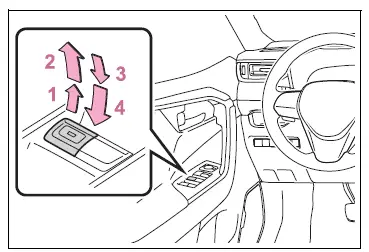
- Closing
- One-touch closing*
- Opening
- One-touch opening*
*: To stop the side window partway, operate the switch in the opposite direction.
â– The power windows can be operated when
The engine switch is in ON.
â– Operating the power windows after turning the engine off
The power windows can be operated for approximately 45 seconds even after the engine switch is turned to ACC or OFF. They cannot, however, be operated once either front door is opened.
â– Jam protection function
If an object becomes jammed between the side window and the window frame while the side window is closing, side window movement is stopped and the side window is opened slightly.
â– Catch protection function
If an object becomes caught between the door and side window while the side window is opening, side window movement is stopped.
â– When the power window cannot be opened or closed
When the jam protection function or catch protection function operates unusually and the side window cannot be opened and closed, perform the following operations with the power window switch of that door.
- Stop the vehicle. With the engine switch in ON, within 4 seconds of the jam protection function or catch protection function activating, continuously operate the power window switch in the one-touch closing direction or one-touch opening direction so that the side window can be opened and closed.
- If the side window cannot be opened and closed even when performing the above operations, perform the following procedure for function initialization.
1. Turn the engine switch to ON.
2. Pull and hold the power window switch in the one-touch closing direction and completely close the side window.
3. Release the power window switch for a moment, resume pulling the switch in the one-touch closing direction, and hold it there for approximately 6 seconds or more.
4. Press and hold the power window switch in the one-touch opening direction. After the side window is completely opened, continue holding the switch for an additional 1 second or more.
5. Release the power window switch for a moment, resume pushing the switch in the one-touch opening direction, and hold it there for approximately 4 seconds or more.
6. Pull and hold the power window switch in the one-touch closing direction again. After the side window is completely closed, continue holding the switch for a further 1 second or more.
If you release the switch while the side window is moving, start again from the beginning.
If the side window reverses and cannot be fully closed or opened, have the vehicle inspected by your Toyota dealer.
â– Door lock linked power window operation
- The power windows can be opened and closed using the key (vehicles without smart key system) or mechanical key (vehicles with smart key system).*
- The power windows can be opened using the wireless remote control.*
- Vehicles with alarm: The alarm may be triggered if the alarm is set and the power window is closed using the door lock linked power window operation function.
*: These settings must be customized at your Toyota dealer.
â– Power window open reminder function
Vehicles without smart key system
The buzzer sounds and a message is shown on the multi-information display when the key has been removed from the engine switch and the driver's door is opened with the power windows open.
Vehicles with smart key system
The buzzer sounds and a message is shown on the multi-information display when the engine switch is turned to OFF and the driver's door is opened with the power windows open.
â– Customization
Settings (e.g. linked door lock operation) can be changed.
WARNING
Observe the following precautions.
Failing to do so may result in death or serious injury.
â– Closing the power windows
- The driver is responsible for all
the power window operations,
including the operation for the
passengers. In order to prevent
accidental operation, especially
by a child, do not let a child
operate the power windows. It is
possible for children and other
passengers to have body parts
caught in the power window.
Also, when riding with a child, it is recommended to use the window lock switch.
- Check to make sure that all passengers do not have any part of their body in a position where it could be caught when a power window is being operated.
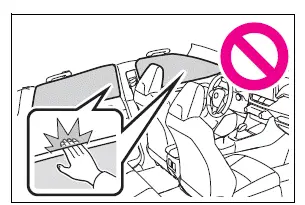
- When using the wireless remote control, key or mechanical key and operating the power windows, operate the power window after checking to make sure that there is no possibility of any passenger having any of their body parts caught in the side window. Also, do not let a child operate the power window by the wireless remote control, key or mechanical key. It is possible for children and other passengers to get caught in the power window.
- When exiting the vehicle, turn the engine switch to OFF, carry the key and exit the vehicle along with the child. There may be accidental operation, due to mischief, etc., that may possibly lead to an accident.
â– Jam protection function
- Never use any part of your body to intentionally activate the jam protection function.
- The jam protection function may not work if something gets jammed just before the side window is fully closed. Be careful not to get any part of your body jammed in the side window.
â– Catch protection function
- Never use any part of your body or clothing to intentionally activate the catch protection function.
- The catch protection function may not work if something gets caught just before the side window is fully opened. Be careful not to get any part of your body or clothing caught in the side window.
Preventing accidental operation (window lock switch)
This function can be used to prevent children from accidentally opening or closing a passenger window.
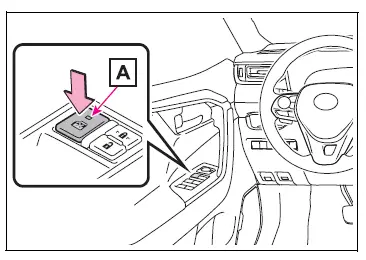
Press the switch.
The indicator A will come on and the passenger windows will be locked.
The passenger windows can still be opened and closed using the driver's switch even if the lock switch is on.
â– The window lock switch can be operated when
The engine switch is in ON.
â– When the battery is disconnected
The window lock switch is disabled.
If necessary, press the window lock switch after reconnecting the battery.

 Moon roof
Use the overhead switches
to open and close the moon
roof and tilt it up and down.
Operating the moon roof
â– Opening and closing
Opens the moon roof*
The moon roof stops slightly before
the ful ...
Other materials:
Adjusting the mirror
â– Adjusting the mirror height
The height of the rear view mirror
can be adjusted to suit your
driving posture.
Change to optical mirror mode,
adjusting the height of the rear
view mirror by moving it up and
down.
â– Display settings (digital
mirror mode)
Settings of the display in the digital
m ...
Exhaust pipe
Components
Removal
Disconnect cable from negative battery terminal
Caution:
Wait at least 90 seconds after disconnecting the
cable from the negative (-) battery terminal to
prevent airbag and seat belt pretensioner activation.
Remove heated oxygen sensor (for bank 1
sensor 2) (s ...
Components
...
