
Toyota RAV4 (XA40) 2013-2018 Service Manual: Problem symptoms table
Hint:
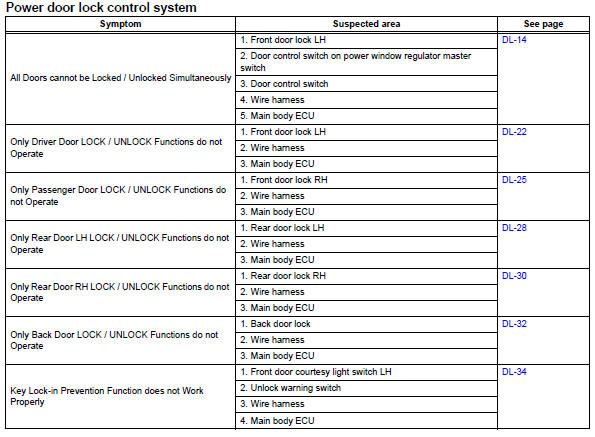
Use the table below to help determine the cause of the problem symptom. The potential causes of the symptoms are listed in order of probability in the "suspected area" column of the table. Check each symptom by checking the suspected areas in the order they are listed. Replace parts as necessary.
 Customize parameters
Customizing function with intelligent
tester (reference)
Hint:
The following item can be customized.
Notice:
When the customer requests a change in a
function, first make sure that the ...
 Terminals of ecu
Check instrument panel junction block (main body ecu)
Disconnect the ib and ie junction block connectors.
Measure the voltage and resistance of the wire
harness side connectors.
...
Other materials:
On-vehicle inspection
Check steering pad assembly (vehicle not involved in collision and
airbag not deployed)
Perform a diagnostic system check (see page rs-
49).
With the steering pad (with airbag) installed on the
vehicle, perform a visual check:
check for cuts, cracks or discoloration on the
...
Parts location
System diagram
...
Dinghy towing
Your vehicle is not designed to be dinghy towed (with 4 wheels
on the ground) behind a motor home.
Notice
To avoid serious damage to your vehicle
Do not tow your vehicle with 4 wheels on
the ground.
To prevent causing serious damage to the transmission and dynamic
torque control awd system ( ...
