
Toyota RAV4 (XA50) 2019-2026 Owners Manual: Steering wheel
Adjustment procedure
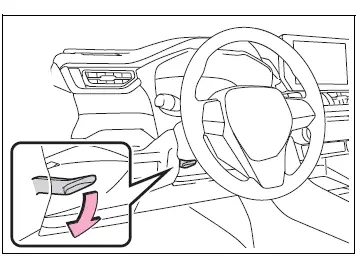
1. Hold the steering wheel and push the lever down.
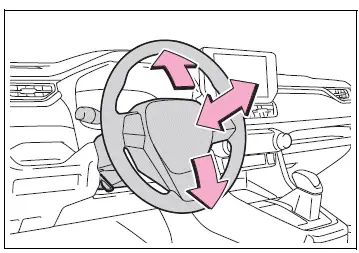
2. Adjust to the ideal position by moving the steering wheel horizontally and vertically.
After adjustment, pull the lever up to secure the steering wheel.
WARNING
â– Caution while driving
Do not adjust the steering wheel while driving.
Doing so may cause the driver to mishandle the vehicle and cause an accident, resulting in death or serious injury.
â– After adjusting the steering wheel
Make sure that the steering wheel is securely locked.
Otherwise, the steering wheel may move suddenly, possibly causing an accident, and resulting in death or serious injury. Also, the horn may not sound if the steering wheel is not securely locked.
Sounding the horn
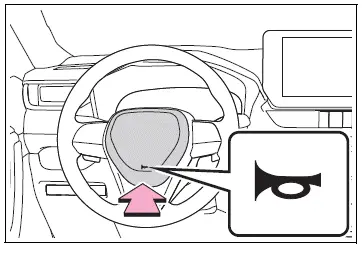
To sound the horn, press on or
close to the  mark.
mark.

 Inside rear view mirror
The rear view mirror's position
can be adjusted to
enable sufficient confirmation
of the rear view.
Adjusting the height of
rear view mirror
The height of the rear view mirror
can be adjusted to suit ...
Other materials:
Installation
Install camshaft timing oil control valve
assembly
Apply a light coat of engine oil to the o-ring of the oil
control valve.
Install the oil control valve with the bolt.
Torque: 9.0 N*m (92 kgf*cm, 80 in.*Lbf)
Notice:
Make sure that the o-ring is not cracked or
jammed.
Co ...
Rear door courtesy switch
Components
Removal
Hint:
Use the same procedures for the rh and lh sides.
The procedures listed below are for the lh side.
Disconnect cable from negative battery
terminal
Caution:
Wait at least 90 seconds after disconnecting the
cable from the negative (-) battery terminal t ...
Dtc check / clear
Check dtc
Connect the intelligent tester to the dlc3.
Turn the ignition switch on and turn the tester on.
Select the following menu item: body / sliding roof /
dtc.
Check the dtc(s).
Clear dtc
Connect the intelligent tester to the dlc3.
Turn the ignition switch on ...
