
Toyota RAV4 (XA40) 2013-2018 Owners Manual: The rear cross traffic alert function
The rear cross traffic alert functions when your vehicle is in reverse.
It can detect other vehicles approaching from the right or left rear of the vehicle. It uses radar sensors to alert the driver of the other vehicle’s existence through flashing the outside rear view mirror indicators and sounding a buzzer.
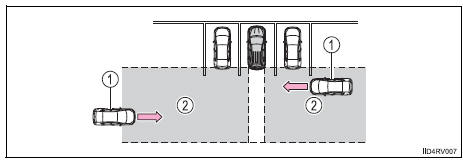
- Approaching vehicles
- Detection areas
Caution
Cautions regarding the use of the system
The driver is solely responsible for safe driving. Always drive safely, taking care to observe your surroundings.
The rear cross traffic alert function is only an assist and is not a replacement for careful driving. The driver must be careful when backing up, even when using the rear cross traffic alert function. The driver’s own visual confirmation of behind you and your vehicle is necessary and be sure there are no pedestrians, other vehicles, etc. Before backing up. Failure to do so could cause death or serious injury.
According to conditions, the system may not function correctly. Therefore the driver’s own visual confirmation of safety is necessary.
 The rear cross traffic
alert function
The rear cross traffic
alert function
The areas that vehicles can be detected in are outlined below.
The range of the detection area
extends to:
Approximately 11.5 Ft. (3.5 M)
from the side of the vehicle
The first 1.6 Ft. (0 ...
 The rear cross traffic alert function detection areas
The areas that vehicles can be detected in are outlined below.
To give the driver a more consistent time to react, the buzzer can alert
for faster vehicles from farther away.
Example:
The rea ...
Other materials:
Data list / active test
Read data list
Hint:
Using the intelligent tester's data list allows switch,
sensor, actuator and other item values to be read without
removing any parts. Reading the data list early in
troubleshooting is one way to save time.
Connect the intelligent tester (with can vim) to the
dlc3 ...
Abs warning light does not come on
Wiring diagram
Refer to the abs warning light circuit (see page bc-135).
Inspection procedure
Check can communication system
Check if the can communication system dtc is output
(see page ca-34).
Result
Perform active test by intelligent tester (abs warning light)
Sele ...
If the vehicle becomes
stuck
Carry out the following procedures
if the tires spin or
the vehicle becomes stuck
in mud, dirt or snow:
Recovering procedure
1. Stop the engine. Set the
parking brake and shift the
shift lever to P.
2. Remove the mud, snow or
sand from around the stuck
tire.
3. Place wood, stones or some
other mat ...
