
Toyota RAV4 (XA40) 2013-2018 Owners Manual: Using the interior lights
Interior lights list
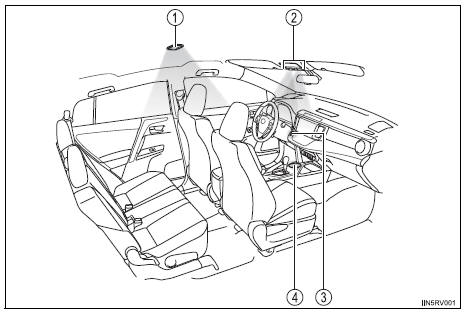
- Interior lights
- Interior/personal lights
- Engine switch light (if equipped)
- Cup holder light (if equipped)
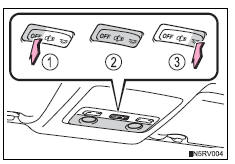
Interior lights
Front
- Off
- Door position
The interior lights come on when a door is opened. They turn off when the doors are closed.
- On
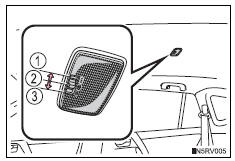
Rear
- Off
- Door position
The interior light comes on when a door is opened. It turns off when the doors are closed.
- On
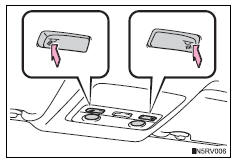
Personal lights
Turns the light on/off
Illuminated entry system
- Vehicles without a smart key system
The lights automatically turn on/off according to the engine switch position, whether the doors are locked/unlocked, and whether the doors are open/ closed.
- Vehicles with a smart key system
The lights automatically turn on/off according to engine switch mode, the presence of the electronic key, whether the doors are locked/unlocked, and whether the doors are opened/closed.
To prevent battery discharge
If the following lights remain on when the door is not fully closed and the interior light main switch is in the door position, the lights will go off automatically after 20 minutes:
- Interior light
- Engine switch light (if equipped)
Customization
Setting (e.G. The time elapsed before lights turn off) can be changed.
 Voice command system
The voice command system enables the hands-free system to
be operated using voice commands.
Using the voice command system
Press the talk switch.
To cancel the voice command system,
press an ...

Other materials:
Child restraint system
â– Types of child restraint system installation methods
Confirm with the operation manual enclosed with the child restraint
system about the installation of the child restraint system.
Seat belt attachment
Child restraint LATCH
anchors attachment
Anchor brackets (for
top tether strap) attachment
...
Using the aux port
To use the aux port, connect a portable player, press the
“audio� button, then select “aux� to display the audio control
screen.
Connecting a portable audio player
Operating portable audio players connected to the audio system
The volume can be adjusted using the vehicle’s audio contr ...
Customization
Customizable features
Your vehicle includes a variety of electronic features that can be
personalized to your preferences. The settings of these features
can be changed by using the steering wheel switches, entune
premium audio with navigation or entune audio, or at your
toyota dealer.
Customi ...
