
Toyota RAV4 (XA40) 2013-2018 Service Manual: Data list / active test
- Read data list
Hint:
Using the intelligent tester's data list allows switch, actuator and other item values to be read without removing any parts. Reading the data list early in troubleshooting is one way to save time.
- Connect the intelligent tester (with can vim) to the dlc3.
- Turn the ignition switch on.
- Read the data list according to the display on the tester.
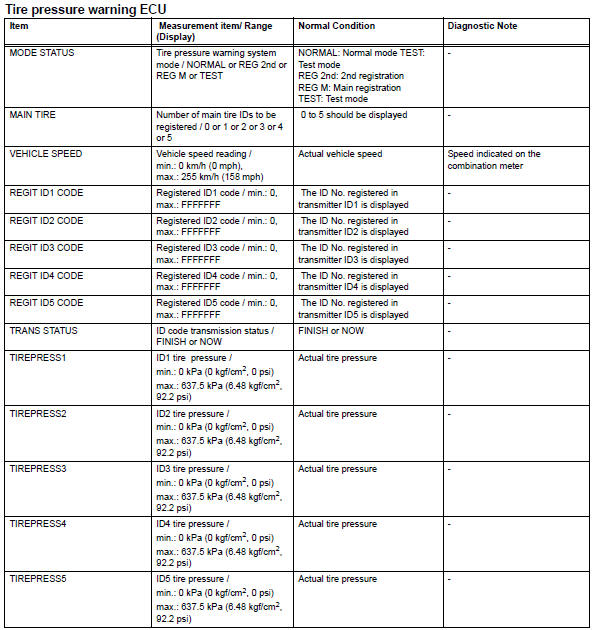
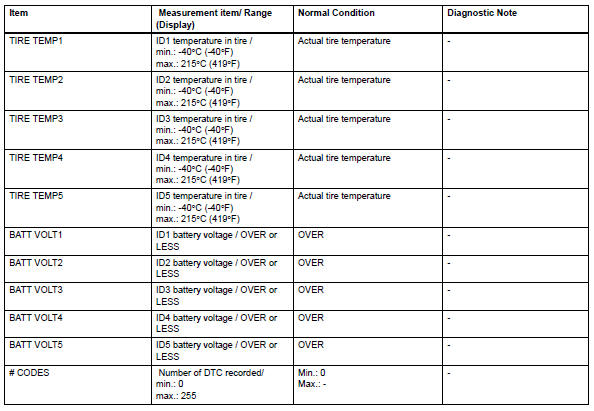
 Diagnosis system
Check dlc3
The ecm uses iso 15765-4 for communication. The
terminal arrangement of the dlc3 complies with sae
j1962 and matches the iso 15765-4 format.
If the result is not as spe ...
 Diagnostic trouble code chart
Hint:
If a trouble code is displayed during the dtc check, check
the circuit listed for that code in the table below. Then
proceed to the appropriate page.
...
Other materials:
Reassembly
Install piston
Using a small screwdriver, install a new snap ring
onto one end of the piston pin hole.
Hint:
Make sure that the end gap of the snap ring is not
aligned with the pin hole cutout portion of the piston.
Gradually heat the piston up to 80 to 90°c (176 to
194°f ...
Abnormal temperature inside
Description
The tire pressure warning valve and transmitter measures tire internal
temperature as well as tire
pressure, and transmits the information to the tire pressure monitor receiver
along with the transmitter id.
If the measured temperature is out of the specified range, the tire ...
Headlight relay
On-vehicle inspection
Remove headlight relay
Remove the headlight relay from the engine room
no. 2 Relay block.
Measure the resistance of the relay.
Standard resistance
If result is not as specified, replace the relay. ...
