
Toyota RAV4 (XA40) 2013-2018 Service Manual: Data list / active test
- Read data list
Hint:
Using the intelligent tester's data list allows switch, sensor, actuator and other item values to be read without removing any parts. Reading the data list early in troubleshooting is one way to save time.
- Connect the intelligent tester (with can vim) to the dlc3.
- Turn the ignition switch on.
- Read the data list on the tester's screen.
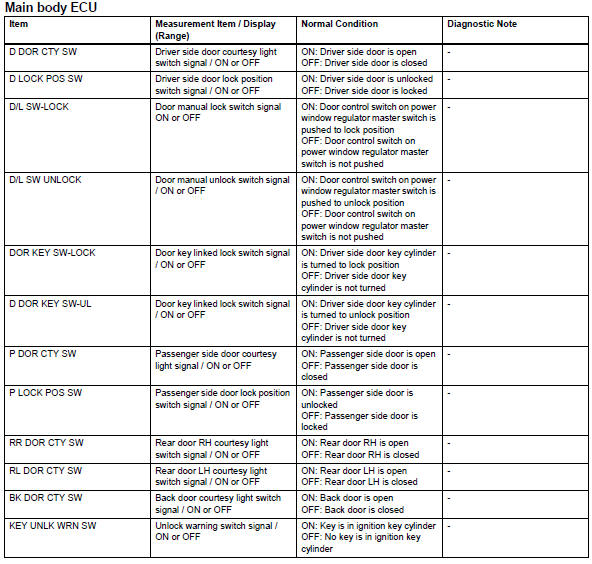
- Perform active test
Hint:
Performing the intelligent tester's active test allows relay, vsv, actuator and other items to be operated without removing any parts. Performing the active test early in troubleshooting is one way to save time.
The data list can be displayed during the active test.
- Connect the intelligent tester (with can vim) to the dlc3.
- Turn the ignition switch on.
- Perform the active test according to the display on the tester.

- All doors cannot be locked / unlocked simultaneously
- Only driver door lock / unlock functions do not operate
- Only passenger door lock / unlock functions do not operate
- Only rear door lh lock / unlock functions do not operate
- Only rear door rh lock / unlock functions do not operate
- Only back door lock / unlock functions do not operate
- Key lock-in prevention function does not work properly
 Diagnosis system
Description
Power door lock control system data can be read in the
data link connector 3 (dlc3) of the vehicle. When the
system seems to be malfunctioning, use the intelligent
tester to check ...
 All doors cannot be locked / unlocked simultaneously
Description
The main body ecu receives switch signals from the door control switch on the
power window regulator
master switch, door control switch and driver side door key cylinder, and
activat ...
Other materials:
Ts and cg terminal circuit
Description
If the vehicle is stationary during sensor check mode, speed sensor
malfunctions cannot be detected. The
vehicle must be driven for speed sensor malfunctions to be detected.
Hint:
Change to sensor check mode by connecting terminals tc and cg of the dlc3,
and turning the ignitio ...
Winter driving tips
Carry out the necessary
preparations and inspections
before driving the
vehicle in winter. Always
drive the vehicle in a manner
appropriate to the prevailing
weather conditions.
Pre-winter preparations
Use fluids that are appropriate
to the prevailing outside temperatures.
Engine oil
Engine c ...
Outer rear view mirror
Components
Removal
Hint:
Use the same procedures for the lh side and rh side.
The procedures listed below are for the lh side.
Remove front door lower frame bracket
garnish lh (see page ed-19)
Remove front armrest upper base panel
lh (see page ed-19)
Remove front door t ...
