
Toyota RAV4 (XA40) 2013-2018 Service Manual: Dtc check / clear
- Check dtc
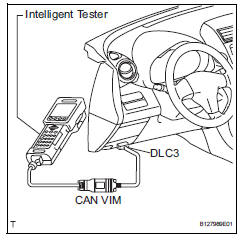
- When using intelligent tester:
- Connect the intelligent tester (with can vim) to the dlc3.
- Turn the ignition switch on and press the intelligent tester main switch on.
- Read the dtcs by following the prompts on the intelligent tester.
Hint:
Refer to the intelligent tester operator's manual for further details.
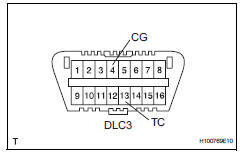
- When not using intelligent tester:
- Using sst, connect terminals 13 (tc) and 4
(cg) of the dlc3.
Sst 09843-18040
- Turn the ignition switch on.
- Read and write down any dtcs indicated by the
p/s warning light on the combination meter.
Refer to the chart below for examples of a normal code and dtcs 21 and 22.
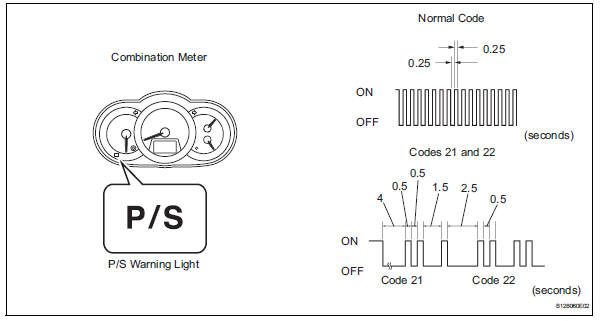
Hint:
- If the p/s warning light does not blink to
display any dtcs set or the normal code,
inspect the circuit shown in the table below.

- If two or more malfunctions are detected simultaneously, dtcs will be displayed in ascending numerical order.
- Refer to the diagnostic trouble code chart (see page ps-16) for dtc information.
- Clear dtc
- When using intelligent tester:
- Connect the intelligent tester (with can vim) to the dlc3.
- Turn the ignition switch on and press the intelligent tester main switch on.
- Clear the dtcs by following the prompts on the intelligent tester.
- Turn the ignition switch off.
- Disconnect the intelligent tester from the dlc3.
- When not using intelligent tester:
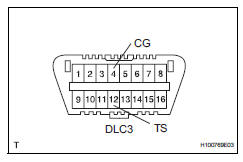
- Using sst, connect terminals 12 (ts) and 4
(cg) of the dlc3.
Sst 09843-18040
- Turn the ignition switch on.
- Disconnect the sst check wire from terminal 4 (cg) and reconnect it, and repeat this procedure 4 times or more within 8 seconds.
- Check that the p/s warning light blinking pattern is the normal code.
- Turn the ignition switch off.
- Remove sst from the dlc3.
 Diagnosis system
Check dlc3
Check the dlc3:
the power steering ecu uses can (iso11898-1)
and iso9141-2 for communication protocol. The
terminal arrangement of the dlc3 complies with
sae j1962 and ...
 Freeze frame data
Freeze frame data
Notice:
It is difficult to show the specified values
(judgment values) clearly because freeze frame
data values change significantly due to
differences in measurement ...
Other materials:
Handling of hose clamps
Before removing the hose, check the clamp position
so that it can be reinstalled in the same position.
Replace any deformed or dented clamps with new
ones.
When reusing a hose, attach the clamp on the
clamp track portion of the hose.
For a spring type clamp, you may want to spread ...
Reassembly
Hint:
Thoroughly clean all parts to be assembled.
Before installing the parts, apply fresh engine oil to all
sliding and rotating surfaces.
Replace oil seals with new ones.
Install valve stem oil seal
Using sst, push in a new oil seal.
Sst 09201-41020
Hint:
The int ...
Front wiper rubber
Components
Removal
Remove front wiper blade
Detach the claw as shown in the illustration.
Remove the wiper blade as shown in the illustration.
Notice:
Do not fold the wiper arm with the wiper blade
removed. The arm tip may damage the
windshield surface.
Rem ...
