
Toyota RAV4 (XA40) 2013-2018 Service Manual: How to proceed with troubleshooting
Hint:
- Use these procedures to troubleshoot the tire pressure warning system.
- *: Use the intelligent tester.
- Vehicle brought to workshop

- Inspect battery voltage
Standard voltage: 11 to 14 v
If the voltage is below 11 v, recharge or replace the battery before proceeding.

- Check indicator light
- Check the indicator light (see page tw-17).

- Check dtc*
- Check for dtc (see page tw-20).
- Clear the dtc (see page tw-20).
- Recheck for dtc (see page tw-20).
Result 


- Dtc chart
- Check for tire pressure warning system dtc output (see page tw-22).
- Problem symptom confirmation

- Problem symptoms table
Result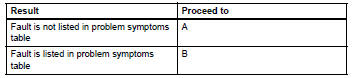


- Overall analysis and troubleshooting*
- Terminals of ecu (see page tw-16).
- Data list/active test (see page tw-21).

- Repair or replace

- Confirmation test

End
 System description
Description of system
A tire pressure warning antenna and receiver is
equipped with a tire pressure sensor and a
transmitter and is installed in each tire wheel. The
sensor measures the ...
 Registration
In case of tire pressure warning ecu
replacement
Read id stored in the old ecu using the intelligent
tester.
In case of tire pressure warning valve and
transmitter and/or tire pre ...
Other materials:
Back-up light circuit
Description
The park / neutral position switch turns on when the shift lever is moved
into the r position, causing the
back-up lights to illuminate.
Wiring diagram
Inspection procedure
Inspect fuse (gauge1)
Remove the gauge1 fuse from the instrument panel
junction block.
Meas ...
Removal (2005/11-2006/01)
Disconnect cable from negative battery
terminal
Caution:
Wait at least 90 seconds after disconnecting the
cable from the negative (-) battery terminal to
prevent airbag and seat belt pretensioner activation.
Remove front door scuff plate lh
Using a screwdriver, detach the 10 cla ...
Removal (2005/11-2006/01)
Disconnect cable from negative battery
terminal
Caution:
Wait at least 90 seconds after disconnecting the
cable from the negative (-) battery terminal to
prevent airbag and seat belt pretensioner activation.
Remove air cleaner case sub-assembly
Remove the air cleaner case (see ...
