
Toyota RAV4 (XA40) 2013-2018 Service Manual: Seat heater system
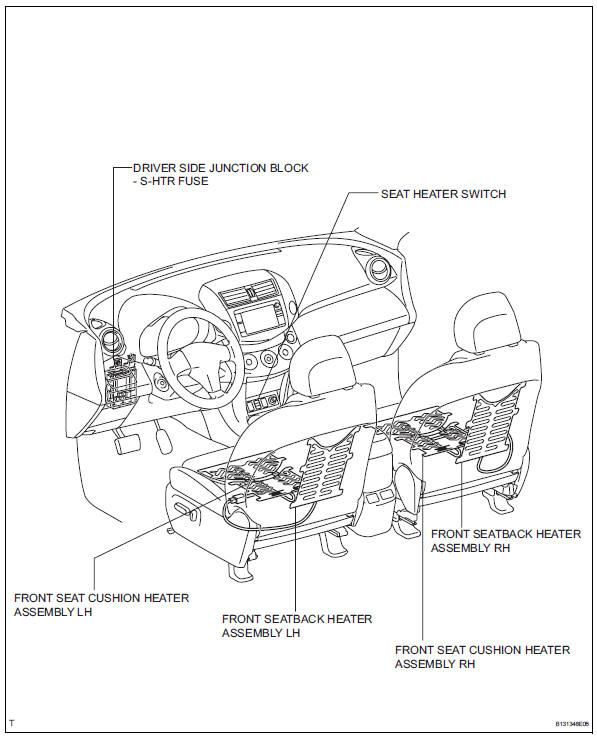
Parts location
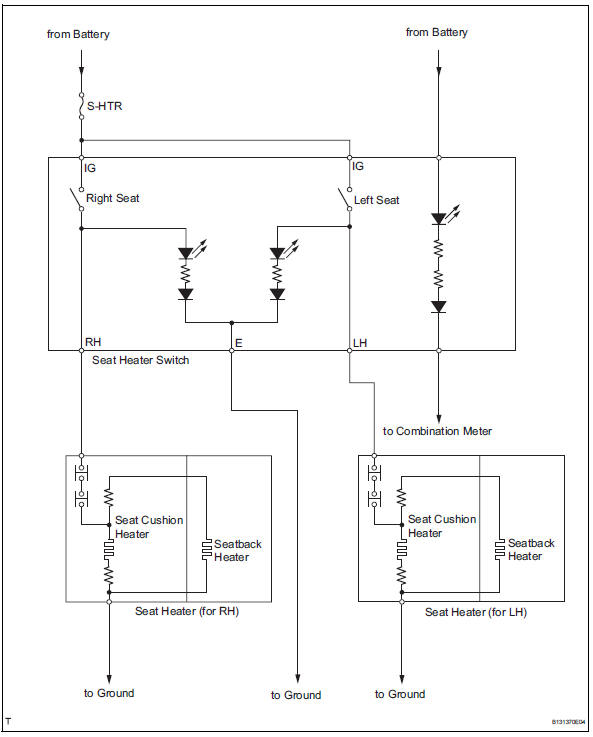
System diagram
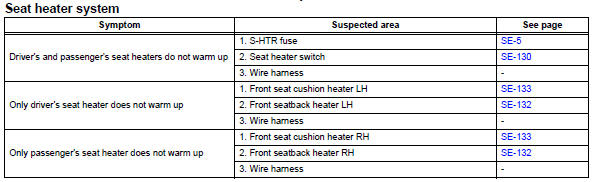
Problem symptoms table
Hint:
Use the table below to help determine the cause of the problem symptom. The potential causes of the symptoms are listed in order of probability in the "suspected area" column of the table. Check each symptom by checking the suspected areas in the order they are listed. Replace parts as necessary.
 Front power seat control system
Parts location
System diagram
Problem symptoms table
Hint:
Use the table below to help determine the cause of the
problem symptom. The potential causes of the symptoms are
listed in orde ...
 Front seat assembly (for manual seat)
Components
...
Other materials:
Function summary
The following operations can be performed simply by carrying the
electronic key on your person, for example in your pocket. (The driver
should always carry the electronic key.)
Locks and unlocks the side doors
Locks and unlocks the back door
Starts the engine
Operation signals
A bu ...
Throttle / pedal position sensor / switch "A"
Hint:
These dtcs relate to the throttle position (tp) sensor.
Description
The tp sensor is mounted on the throttle body, and detects the opening angle
of the throttle valve. This
sensor is a non-contact type. It uses hall-effect elements in order to yield
accurate signals even in
extrem ...
Maintenance data (fuel, oil
level, etc.)
Dimensions and weights
*1:Unladen vehicle
*2:Vehicles without 235/55R19 tires
*3:Vehicles with 235/55R19 tires
*4:Vehicles without towing package
*5:Vehicles with towing package
Seating capacity
Vehicle identification
â– Vehicle identification number
The vehicle identification number
(VIN) is the ...
